


Text input and editing
Accept single-line and multi-line text input, manage selection,
undo history and clipboard actions, and validate or mask input
with TextInput and TextEdit.
Use
TextInput for a single-line editable field with length limits, echo modes and validators, and use TextEdit when you need multi-line wrapping text editing or text longer than 32,767 characters.A new
TextInput starts with text: "", cursorPosition: 0, maximumLength: 32767, acceptableInput: true, readOnly: false, echoMode: TextInput.Normal, selectByMouse: true, activeFocusOnPress: true and activeFocusOnTab: false. If you omit width, a TextInput sizes its width to its text, rounded up.When a
TextInput is created with initial text, or when your code assigns a new string to text, cursorPosition moves to the end of the text. Assigning the string it already holds changes nothing. You can set cursorPosition anywhere within the text; out-of-range positions are ignored.Typing inserts characters at the cursor (emitting
textEdited), or replaces any active selection. In overwriteMode, a typed character replaces the character immediately after the cursor instead of inserting. Backspace and Delete remove characters or the current selection. Pressing Return or keypad Enter emits editingFinished followed by accepted. Losing focus also emits editingFinished, hides the cursor (cursorVisible) and drops the selection unless persistentSelection is true.Watch out for the differences between
TextInput, TextEdit and readOnly:Assigning
text in TextEdit places the cursor at the start (0), whereas TextInput places it at the end.TextInput cuts assigned, inserted or typed text to maximumLength (default 32767), whereas TextEdit keeps text longer than 32,767 characters and supports multi-line wrapping via wrapMode (TextEdit.NoWrap, TextEdit.WordWrap, TextEdit.WrapAnywhere) as well as paintedWidth and paintedHeight.Setting
readOnly: true hides the cursor and blocks typed characters, Backspace, Cut and Paste, but the user can still move the cursor, select text and Copy (Ctrl+C), and your code can still call insert without recording an undo step.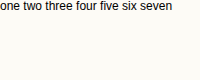
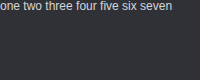
The
TextEdit wraps its text at word boundaries inside 180 pixels, and double-clicking selects the word under the pointer.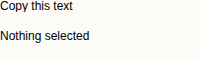

In this read-only
TextInput, the user can select and copy with Ctrl+C, while typing and Backspace do nothing. The line below shows what is selected.With
selectByMouse: true (and mouseSelectionMode set to SelectCharacters or SelectWords), pressing places the cursor and takes focus (unless activeFocusOnPress is false), dragging selects from the press point to the current pointer position (even when dragging outside the item), double-clicking selects the word under the pointer, and triple-clicking in a TextInput selects all of the text. Without selectByMouse, dragging and double-clicking select nothing.From script, you can inspect
selectionStart, selectionEnd and selectedText (styled with selectionColor and selectedTextColor), or call:select(start, end), which places the cursor at end; selectAll(), which places the cursor at the end of the text; selectWord(), which selects the word at the cursor; and deselect(), which clears the selection without moving the cursor. Moving the cursor also drops the selection. insert(position, text), remove(start, end), getText(start, end) and clear(), plus moveCursorSelection, positionAt, positionToRectangle and ensureVisible.copy(), cut() and paste() (matching Ctrl+C, Ctrl+X and Ctrl+V; Ctrl+A selects all), with canPaste indicating whether the clipboard holds text. Copying with no selection leaves the clipboard unchanged.Undo (
Ctrl+Z or undo()) and redo (redo(), tracked by canUndo and canRedo) group edits into steps:A continuous run of typed characters is undone in a single step, returning the cursor to where the run began; moving the cursor ends the run.
Typing over a selection undoes both the typed character and the replaced selection together.
Several Backspaces in a row form one undo step; Paste and
clear() are also undoable steps.Consecutive edits made via methods like
insert form one undo step unless separated by a cursor move.Making a new edit discards the redo history, and assigning
text directly clears the entire undo history.Assigning an
IntValidator, DoubleValidator or RegularExpressionValidator to validator filters what the user can type: any character that cannot possibly lead to a valid string is refused immediately, while intermediate strings that could still become valid are allowed into text with acceptableInput set to false.IntValidator: takes bottom and top (without a range, it allows up to ten digits). A typed number below bottom is kept while typing so the user can add more digits, but acceptableInput is false; a typed number above top is cut back where a shorter prefix is acceptable (with bottom: 10 and top: 99, typing 100 leaves 10), and otherwise kept with acceptableInput set to false.DoubleValidator: takes bottom, top, decimals and notation (DoubleValidator.StandardNotation, DoubleValidator.ScientificNotation). decimals limits the number of fractional digits, and in StandardNotation a comma is rejected as a decimal point.RegularExpressionValidator: accepts strings that match the whole regularExpression (an empty pattern accepts everything).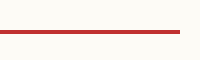

Typing
5 into the empty field is allowed because it could become 50, but acceptableInput is false so the bar turns red; typing 0 makes 50 and turns the bar green. Typing 100 cuts the input to 10.Keep two validator rules in mind:
Pressing Return while
acceptableInput is false emits neither accepted nor editingFinished.A validator only filters user typing and IME commits; if your code assigns an invalid string to
text, the string is kept and acceptableInput becomes false.Use
echoMode to mask sensitive input while keeping the underlying text:TextInput.Normal: displays text as-is in displayText.TextInput.Password: displays one passwordCharacter (default •) per character in displayText. A password field blocks Copy and Cut and prevents word-by-word cursor jumps inside the text, though script can still read selectedText.TextInput.NoEcho: hides everything (displayText is "", contentWidth is 0 and the cursor stays at 0) while keeping text.TextInput.PasswordEchoOnEdit: displays characters while the user is editing, and masks the field when focus leaves or when the application assigns text. Editing a masked field clears it and starts over.

During input-method (IME) composition (
inputMethodComposing), the uncommitted text appears at the cursor in preeditText and displayText, leaving text unchanged until committed. When committed, the text replaces any selection, counts as a single undo step, and is checked against validator and maximumLength. Losing focus or switching readOnly to true cancels an active composition without inserting it.Assigning
text on a TextEdit moves the cursor to the start (0), whereas on a TextInput it moves the cursor to the end.A validator filters typed and committed characters only; assigning an unacceptable string to
text from script keeps the string and sets acceptableInput to false.TextInput.NoEcho keeps text but draws nothing (displayText is "", contentWidth is 0 and the cursor sits at 0).