
Elegant
States and Transitions
Group property, anchor, parent, and script changes into named or conditional states, and animate between states with Transitions.
After reading this page, you will be able to declare states on an Item or in a StateGroup, modify properties, anchors, parents, and handlers with change elements, use conditional Binding objects, and animate state changes with Transition.
Declaring states
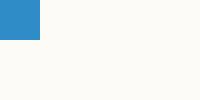
Every Item has a states list and a state string property. When an item is created with no state specified, it starts in the base state (state: ""), where all properties have the values and bindings written on the item itself.
You enter a state either by assigning its name to state or by giving the State a boolean when binding. Leaving a state for "" (or another state) restores the values and bindings the item had in the base state.

Main.qml
QML
Copy
import Ljos.Ui

Item {
    id: root
    width: 200
    height: 100
    property bool expanded: false

    Rectangle {
        id: box
        width: 40
        height: 40
        fill: palette.accent
    }

    states: [
        State {
            name: "wide"
            when: root.expanded
            PropertyChanges {
                box.width: 160
                box.fill: palette.linkVisited
            }
        },
        State {
            name: "tall"
            extend: "wide"
            PropertyChanges {
                box.height: 90
            }
        }
    ]
}
Edit
Source
What this example draws
Key rules for states:
Extending states: Setting extend: "wide" on a State applies all changes from "wide" first and then the extending state's own changes.
Nameless states: A State declared without a name can be entered through its when condition alone. Ljós assigns it an automatic name ("anonymousState1", "anonymousState2", counted per item) so item.state holds that name while the state is active.
StateGroup: To give states to a non-visual object such as QtObject, or to maintain a second independent set of states on an Item, declare a StateGroup { states: [ ... ] }.
Hot reload: During hot reload, the active state of an item is preserved as runtime state, while the values that the state applies (and the base values restored on exit) are updated from the reloaded file.
PropertyChanges
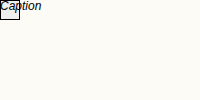
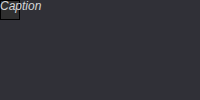
Inside a State, PropertyChanges specifies which properties or signal handlers change while the state is active. Each change names its object, as id.property: value:
Main.qml
QML
Copy
import Ljos.Ui
import Ljos.Core

Item {
    id: root
    width: 200
    height: 100
    property int dynamicHeight: 60
    property string log: ""

    Rectangle {
        fill: palette.button
        id: box
        width: 20
        height: 20
        border.width: 1
    }

    Text {
        id: label
        color: palette.windowText
        text: "Caption"
        font.size: 12
        font.italic: true
    }

    Object {
        id: action
        signal clicked()
        onClicked: root.log += "base "
    }

    states: [
        State {
            name: "active"
            PropertyChanges {
                box.width: 80
                box.height: root.dynamicHeight
                box.border.width: 3
                label.font.size: 20
                action.onClicked: root.log += "active "
            }
        },
        State {
            name: "snapshot"
            PropertyChanges {
                explicit: true
                restoreEntryValues: false
                box.width: root.dynamicHeight
            }
        }
    ]
}
Edit
Source
What this example draws
How PropertyChanges behaves:
Underlying bindings stay alive: While a state overrides a property, the property's base binding remains alive underneath. When the state is exited, the property immediately reflects the current value of its base binding.
Bindings vs values: A state applies plain values first and bindings after them, so if a state (or a state it extends) gives a property both a plain value and a binding, the binding wins.
Options: Setting explicit: true evaluates expressions in PropertyChanges once when the state is entered rather than installing a live binding. Setting restoreEntryValues: false leaves the changed values in place when the state is exited.
Members, grouped objects, and handlers: PropertyChanges can change individual fields of a value type (label.font.size: 20), properties reached through an alias or object property (bar.back.opacity: 0.5), or signal handlers (action.onClicked: ..., which replaces the object's own handler while the state is active and restores it on exit).
Compiler tiers: Expressions inside PropertyChanges are compiled through the same binding tiers (Tier 0 direct reads, Tier 1 register VM, and Tier 2 QuickJS) as regular property bindings.
AnchorChanges, ParentChange, and StateChangeScript
States can also re-anchor items, reparent items, or run imperative script statements:
Main.qml
QML
Copy
import QtQuick

Item {
    id: root
    width: 200
    height: 200
    property string log: ""

    Item {
        id: dock
        x: 100
        y: 100
        width: 80
        height: 80
    }

    Rectangle {
        color: palette.button
        id: badge
        width: 20
        height: 20
        anchors.left: parent.left
        anchors.top: parent.top
    }

    states: [
        State {
            name: "corner"
            AnchorChanges {
                target: badge
                anchors.left: undefined
                anchors.top: undefined
                anchors.right: root.right
                anchors.verticalCenter: root.verticalCenter
            }
        },
        State {
            name: "docked"
            StateChangeScript {
                script: root.log += "docking "
            }
            ParentChange {
                target: badge
                parent: dock
                x: 4
                y: 4
            }
        }
    ]
}
Edit
Source
What this example draws
AnchorChanges: Changes an item's anchors while the state lasts; setting an anchor to undefined clears it. Anchor margins are changed with PropertyChanges.
ParentChange: Reparents target to a new parent while the state lasts. Unless x and y are specified on the ParentChange, the item's local coordinates are adjusted so it stays at the same position on screen.
StateChangeScript: Runs its script statement when the state is entered, in declaration order amongst the PropertyChanges of that state.
Conditional bindings with Binding
The Binding element applies a value or expression to another object's property for as long as its when condition is true (or from creation if when is omitted), and restores the previous value or binding when when becomes false (including for unknown properties holding arrays or objects):
Main.qml
QML
Copy
import Ljos.Ui
import Ljos.Core

Item {
    id: root
    property bool overrideWidth: true
    property int customWidth: 120

    Rectangle {
        fill: palette.button
        id: panel
        width: 60
        height: 40
    }

    Binding {
        panel.width: root.customWidth
        when: root.overrideWidth
    }
}
Edit
Source
What this example draws
You can specify the target property either with target: panel; property: "width"; value: ... or using the compact panel.width: ... syntax.
Transitions
An item's transitions list defines animations and actions that run when state changes from from to to:
Main.qml
QML
Copy
import Ljos.Ui

Item {
    id: root
    width: 200
    height: 100

    Rectangle {
        id: box
        width: 20
        height: 20
        fill: palette.accent
    }

    states: [
        State {
            name: "expanded"
            PropertyChanges {
                box.width: 140
            }
        }
    ]

    transitions: [
        Transition {
            to: "expanded"
            NumberAnimation {
                target: box
                property: "width"
                duration: 200
            }
        }
    ]
}
Edit
Source
What this example draws
Inside a Transition, you can use animations such as NumberAnimation, RotationAnimation, SmoothedAnimation, SequentialAnimation, PauseAnimation, ScriptAction, and PropertyAction. A PropertyAction without a value applies the state's target value immediately; a PropertyAction with value: undefined resets the property to its type's initial default.
See also
States and Transitions
Group property, anchor, parent, and script changes into named or conditional states, and animate between states with Transitions.
After reading this page, you will be able to declare states on an Item or in a StateGroup, modify properties, anchors, parents, and handlers with change elements, use conditional Binding objects, and animate state changes with Transition.
Declaring states
Every Item has a states list and a state string property. When an item is created with no state specified, it starts in the base state (state: ""), where all properties have the values and bindings written on the item itself.
You enter a state either by assigning its name to state or by giving the State a boolean when binding. Leaving a state for "" (or another state) restores the values and bindings the item had in the base state.
Main.qml
QML
Copy
What this example draws
Edit
Source
import Ljos.Ui

Item {
    id: root
    width: 200
    height: 100
    property bool expanded: false

    Rectangle {
        id: box
        width: 40
        height: 40
        fill: palette.accent
    }

    states: [
        State {
            name: "wide"
            when: root.expanded
            PropertyChanges {
                box.width: 160
                box.fill: palette.linkVisited
            }
        },
        State {
            name: "tall"
            extend: "wide"
            PropertyChanges {
                box.height: 90
            }
        }
    ]
}
Show all 33 lines
Key rules for states:
Extending states: Setting extend: "wide" on a State applies all changes from "wide" first and then the extending state's own changes.
Nameless states: A State declared without a name can be entered through its when condition alone. Ljós assigns it an automatic name ("anonymousState1", "anonymousState2", counted per item) so item.state holds that name while the state is active.
StateGroup: To give states to a non-visual object such as QtObject, or to maintain a second independent set of states on an Item, declare a StateGroup { states: [ ... ] }.
Hot reload: During hot reload, the active state of an item is preserved as runtime state, while the values that the state applies (and the base values restored on exit) are updated from the reloaded file.
PropertyChanges
Inside a State, PropertyChanges specifies which properties or signal handlers change while the state is active. Each change names its object, as id.property: value:
Main.qml
QML
Copy
What this example draws
Edit
Source
import Ljos.Ui
import Ljos.Core

Item {
    id: root
    width: 200
    height: 100
    property int dynamicHeight: 60
    property string log: ""

    Rectangle {
        fill: palette.button
        id: box
        width: 20
        height: 20
        border.width: 1
    }

    Text {
        id: label
        color: palette.windowText
        text: "Caption"
        font.size: 12
        font.italic: true
    }

    Object {
        id: action
        signal clicked()
        onClicked: root.log += "base "
    }

    states: [
        State {
            name: "active"
            PropertyChanges {
                box.width: 80
                box.height: root.dynamicHeight
                box.border.width: 3
                label.font.size: 20
                action.onClicked: root.log += "active "
            }
        },
        State {
            name: "snapshot"
            PropertyChanges {
                explicit: true
                restoreEntryValues: false
                box.width: root.dynamicHeight
            }
        }
    ]
}
Show all 53 lines
How PropertyChanges behaves:
Underlying bindings stay alive: While a state overrides a property, the property's base binding remains alive underneath. When the state is exited, the property immediately reflects the current value of its base binding.
Bindings vs values: A state applies plain values first and bindings after them, so if a state (or a state it extends) gives a property both a plain value and a binding, the binding wins.
Options: Setting explicit: true evaluates expressions in PropertyChanges once when the state is entered rather than installing a live binding. Setting restoreEntryValues: false leaves the changed values in place when the state is exited.
Members, grouped objects, and handlers: PropertyChanges can change individual fields of a value type (label.font.size: 20), properties reached through an alias or object property (bar.back.opacity: 0.5), or signal handlers (action.onClicked: ..., which replaces the object's own handler while the state is active and restores it on exit).
Compiler tiers: Expressions inside PropertyChanges are compiled through the same binding tiers (Tier 0 direct reads, Tier 1 register VM, and Tier 2 QuickJS) as regular property bindings.
AnchorChanges, ParentChange, and StateChangeScript
States can also re-anchor items, reparent items, or run imperative script statements:

Main.qml
QML
Copy
What this example draws
Edit
Source
import QtQuick

Item {
    id: root
    width: 200
    height: 200
    property string log: ""

    Item {
        id: dock
        x: 100
        y: 100
        width: 80
        height: 80
    }

    Rectangle {
        color: palette.button
        id: badge
        width: 20
        height: 20
        anchors.left: parent.left
        anchors.top: parent.top
    }

    states: [
        State {
            name: "corner"
            AnchorChanges {
                target: badge
                anchors.left: undefined
                anchors.top: undefined
                anchors.right: root.right
                anchors.verticalCenter: root.verticalCenter
            }
        },
        State {
            name: "docked"
            StateChangeScript {
                script: root.log += "docking "
            }
            ParentChange {
                target: badge
                parent: dock
                x: 4
                y: 4
            }
        }
    ]
}
Show all 50 lines
AnchorChanges: Changes an item's anchors while the state lasts; setting an anchor to undefined clears it. Anchor margins are changed with PropertyChanges.
ParentChange: Reparents target to a new parent while the state lasts. Unless x and y are specified on the ParentChange, the item's local coordinates are adjusted so it stays at the same position on screen.
StateChangeScript: Runs its script statement when the state is entered, in declaration order amongst the PropertyChanges of that state.
Conditional bindings with Binding
The Binding element applies a value or expression to another object's property for as long as its when condition is true (or from creation if when is omitted), and restores the previous value or binding when when becomes false (including for unknown properties holding arrays or objects):

Main.qml
QML
Copy
What this example draws
Edit
Source
import Ljos.Ui
import Ljos.Core

Item {
    id: root
    property bool overrideWidth: true
    property int customWidth: 120

    Rectangle {
        fill: palette.button
        id: panel
        width: 60
        height: 40
    }

    Binding {
        panel.width: root.customWidth
        when: root.overrideWidth
    }
}
Show all 20 lines
You can specify the target property either with target: panel; property: "width"; value: ... or using the compact panel.width: ... syntax.
Transitions
An item's transitions list defines animations and actions that run when state changes from from to to:

Main.qml
QML
Copy
What this example draws
Edit
Source
import Ljos.Ui

Item {
    id: root
    width: 200
    height: 100

    Rectangle {
        id: box
        width: 20
        height: 20
        fill: palette.accent
    }

    states: [
        State {
            name: "expanded"
            PropertyChanges {
                box.width: 140
            }
        }
    ]

    transitions: [
        Transition {
            to: "expanded"
            NumberAnimation {
                target: box
                property: "width"
                duration: 200
            }
        }
    ]
}
Show all 34 lines
Inside a Transition, you can use animations such as NumberAnimation, RotationAnimation, SmoothedAnimation, SequentialAnimation, PauseAnimation, ScriptAction, and PropertyAction. A PropertyAction without a value applies the state's target value immediately; a PropertyAction with value: undefined resets the property to its type's initial default.
See also