


QML in Ljós
How Ljós reads a QML file as a tree of objects, resolves names
and types ahead of time, and compiles bindings into its
intermediate representation.
After reading this page, you will understand how a
.qml file forms a tree of objects in Ljós, how id and parent names are resolved, where semicolons belong, and what the compiler does with your files before your application runs.A Ljós interface is a tree of objects you declare, with TypeScript for what it does. The declarations are what tools can read and change safely:
ljos fmt lays them out, the MCP authoring server lets an agent check, lint and edit them structurally, hot reload patches a saved change into the running app, and the people who use an app can replace its whole layout with a shell of their own. The scripts are a strict subset of TypeScript, checked in Rust before anything runs, so a mistake is a check error rather than a surprise at run time.A file of Ljós's own API imports its modules by concern:
Ljos.Ui for items, text, images, gestures and states, Ljos.Layout for Row, Column, Box, Grid and Flow, Ljos.Controls for controls, Ljos.Models for models, Ljos.Core for Timer, Connections and other non-visual objects, and Ljos.Design for design tokens.
The handler is TypeScript. Writing
if (root.count == 3) in it stops ljos check with error: `==` converts what it compares; write `===` [ts-loose-equality]. Every program the checker accepts is valid TypeScript with the same meaning, so tsc, editors and coding agents work on it as they do on any TypeScript.Files that import
QtQuick and the other modules existing QML uses run too, with their scripts in JavaScript. A few examples in these pages are still written that way, where Ljós's own modules do not yet have a type they use. Bringing existing QML explains how such a file runs and how ljos migrate moves it to Ljós's API.A QML file defines a single root object and the tree of child objects nested inside it. Every file begins with its
import statements, followed by the root object declaration. Inside an object's braces, you write property assignments, property declarations, signals, JavaScript functions, and child objects.
A child object written inside another object without a property name is added to the enclosing object's default property. For
Item and types derived from it, that default property holds its visual children. Every QML object also inherits QtObject as its implied base and has an objectName string property.An object's body is a set of declarations rather than a list of statements. A semicolon may end a value binding, a property declaration, or a signal declaration, where it is optional. Writing a semicolon after a child object, an object binding (
a: Item {}), an object list (data: [Item {}]), a function, an enumeration, or a script block is a syntax error and stops the file from loading.Any object in a file can be given an
id, such as id: root or id: box. An id is an identifier within that component rather than a string property, and other bindings and handlers in the same component can read its properties and call its methods through that name.When an expression reads an unqualified name, Ljós resolves it in a fixed order at compile time:
1.
Local variables and parameters of the enclosing JavaScript function or signal handler.
2.
Object
ids declared in the component.3.
Properties, signals, and methods of the scope object where the expression is written.
4.
Properties, signals, and methods of the component's root object.
5.
Names from enclosing components and contexts, unless the file sets
pragma ComponentBehavior: Bound.6.
Global objects and functions such as
Qt, Math, Date, console, and qsTr.A component written inside another, such as an inline delegate inside a
Repeater, can read and assign to names belonging to the component around it. If the file starts with pragma ComponentBehavior: Bound, outer-context lookup is restricted so the component only sees names it declares or receives through required properties.

The name
parent depends on the type of object it is read from. An Item has a visual parent property, and a Timer has a parent property that points to the object it is declared in. A plain QtObject has no parent property of its own, so reading parent inside a QtObject looks further out and resolves to parent on the root object of the file.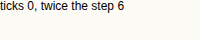

The
Timer here names the Item by its id, root, which reads the same wherever the timer is declared. It counts up in steps of 3 and stops at 30.In a script expression, a QML type name is also a value that can appear on the right-hand side of
instanceof. You can test object instanceof Item, object instanceof Rectangle, or object instanceof MyComponent for built-in types, file components, and inline components alike.Iterating over a QML object with for (var n in obj) lists the properties of its base types first, then the properties the type adds, followed by base signals and the type's own signals.Values written directly in QML source are checked against their property's type when the file is read. Assigning
"tall" to height, 1 to a bool property, 2.5 to an int property, or a primitive to a list property stops the file from loading and reports the line and column of the mistake.

Property names, signal handlers, and grouped properties are also checked against the object's type. A misspelt property such as
widht: 100, border.widht: 2, or onWidhtChanged: {} is rejected when the type is fully described in Ljós's type table or native Rust metadata. If a project contains a broken .qml file that no loaded component instantiates, the rest of the application still loads and runs.Ljós parses QML and embedded JavaScript ahead of time. When the parser encounters an error in one member of an object, it recovers at the next member and returns a partial syntax tree alongside its diagnostics, so
ljos check, the language server, and hot reload can continue analysing the rest of the file.From the syntax tree, the front end builds a project graph, resolves imports and types against its type oracle, and lowers each file into a serialisable intermediate representation (
ComponentDef and ObjectDef). Each ComponentDef carries a structural signature hash of its declared properties, signals, and inline components so hot reload can tell whether a change is a body-only edit or a structural change. In production builds, ljos::build::compile_dir (or ljos::build::compile_dir_with_types) serialises this intermediate representation into the binary alongside the compiled JavaScript module.Every binding and handler is classified at compile time into one of three execution tiers:
Tier 0: The compiler resolves every identifier statically to its target (
Local, Id, ScopeProp, RootProp, OuterId, Attached, Enum, Singleton, ImportNs, Global, ContextProp, or Unknown). There is no dynamic scope-chain walk at run time, and a direct property read is wired straight into the reactive graph.Tier 1 (register VM): Bindings that use literals, resolved property reads and writes, value-type fields, arithmetic, comparisons, logical operators, template strings, pure built-ins (
Math.*, qsTr, Qt.rgba, Qt.point, Qt.size, Qt.rect, String.prototype.arg), and calls to inlinable user functions are compiled to register bytecode. Tier 1 runs without starting the JavaScript engine and works on var properties as well as typed properties.Tier 2 (QuickJS): Closures, loops, arrays,
JSON, regular expressions, imported .js files, and imperative signal handlers compile to functions in the file's JavaScript module, taking their resolved references as parameters.All three tiers read properties through the same reactive graph, so dependency tracking behaves identically regardless of which tier evaluates an expression. You can inspect tier coverage across a project with
ljos check --stats.