Elegant
Models in QML
Feed rows of data into views and repeaters with ListModel, numbers, arrays, ObjectModel, DelegateModel, XmlListModel, JsonListModel, and FolderListModel.
Models supply rows of data to views and repeaters. You use ListModel when you want a mutable table of rows with named roles, plain numbers or arrays for simple lists, ObjectModel when the visual items already exist, DelegateModel when you want to bundle a model with its delegate and filter rows by group, XmlListModel to read XML documents, JsonListModel to read JSON, and FolderListModel to list files and folders on disk.
ListModel and ListElement
ListModel and ListElement come from import Ljos.Models. A ListModel holds rows; each ListElement is a row, and its properties are the row's roles. In a delegate, you read a role by its name, through model.<role>, or as a required property of the same name.
You can inspect and change rows at runtime with count, get(i), index(row, column), append, insert(i, object), remove(i, count) (where count defaults to one), move(from, to, n), set(i, object), setProperty(i, role, value), and clear().
get(i) returns the row as a live object: writing one of its roles changes the row in the model. Reading a row that is not there gives undefined.
append takes either one object or an array of objects.
set(i, object) replaces only the roles the object names. Calling set at the end of the model appends a row.
A ListModel emits a signal for each change: setProperty emits dataChanged with the role, append and insert signal that rows are about to be inserted and then emit rowsInserted, remove and clear emit rowsRemoved, move emits rowsMoved, and row count changes emit countChanged.
Main.qml
QML
Copy
import Ljos.Ui
import Ljos.Core
import Ljos.Models
import Ljos.Layout

Item {
    width: 200
    height: 100

    ListModel {
        id: fruit
        ListElement { name: "apple"; cost: 1.5 }
        ListElement { name: "pear"; cost: 2 }
    }

    Column {
        Repeater {
            model: fruit
            Text {
                required property string name
                required property real cost
                color: palette.windowText
                text: name + " " + cost
            }
        }
    }

    Component.onCompleted: {
        fruit.append({ name: "fig", cost: 3 })
        fruit.setProperty(1, "cost", 2.5)
        fruit.remove(0)
    }
}
Edit
Source
What this example draws
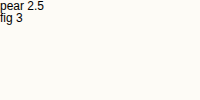
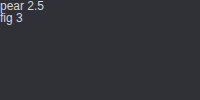
On load, apple is removed, leaving "pear 2.5" and "fig 3".
Keep these pitfalls in mind when working with ListModel:
A role keeps the type of its first value. If you call set with a value of another type, the change is refused, logs Can't assign to existing role 'name' of different type [Number -> String], and the role keeps its previous value.
A role that only a later row defines is undefined in earlier rows.
Calls outside the rows (such as an index past the end, or a move out of range) log a warning and change nothing.
ListModel keeps a deep copy of any object passed to append, insert, or set, so later changes to your original JavaScript object do not reach the rows. Each read of a nested object returns a new copy, and a function in the object does not become a role.
Numbers, strings, arrays, and object lists
You do not always need a ListModel. You can pass simpler values directly as a model:
A number N is a model of N rows whose modelData runs from 0 to N - 1.
An array gives one row per element, and a string gives one row per character.
A list of QtObject items is a model whose rows are those objects; each property of an item is a role of its row, and changing the property updates the delegate.
An array of plain JavaScript objects gives each delegate modelData (so modelData.n reads a member, whilst model.n is undefined), or you can declare required property members matching the object keys.
Main.qml
QML
Copy
import Ljos.Ui
import Ljos.Layout

Column {
    Repeater {
        model: 2
        Text { text: "number " + modelData; color: palette.windowText }
    }
    Repeater {
        model: ["x", "y"]
        Text { text: "array " + modelData; color: palette.windowText }
    }
    Repeater {
        model: "abc"
        Text { text: "letter " + modelData; color: palette.windowText }
    }
    Repeater {
        model: [{ n: "u" }, { n: "v" }]
        Text { text: "object " + modelData.n; color: palette.windowText }
    }
}
Edit
Source
What this example draws
When a delegate of an array of objects uses required property declarations, the role names come from the first row:
Main.qml
QML
Copy
import Ljos.Ui
import Ljos.Layout

Column {
    property unknown days: [{ day: 5, on: true }, { day: 6 }, 7]
    Repeater {
        model: days
        Text {
            required property int day
            required property bool on
            color: palette.windowText
            text: "day " + day + (on ? " on" : " off")
        }
    }
}
Edit
Source
What this example draws
Watch out for these edge cases with value and array models:
null, undefined, and 0 give no rows. A negative number gives no rows and logs Model size of -2 is less than 0.
Without a delegate, a Repeater makes nothing, and a view with a model and no delegate has no rows.
In an array of objects read via required properties, a row lacking one of the first row's properties gets that type's default value (in the example above, the third row is 7, which has no day or on member, so it reads "day 0 off"). Writing to such a required property changes the delegate only, not the array.
On other models, if a delegate declares a required property and no role of that name exists, that delegate is not created and logs Required property missing was not initialized.
ObjectModel and DelegateModel
Both ObjectModel and DelegateModel come from import Ljos.Models.
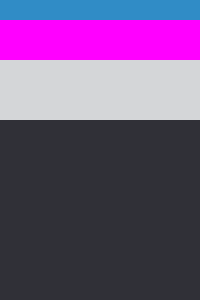
An ObjectModel holds visual items that already exist. A view places each item at its row position and creates no delegate for it. You can read and change its rows with count, children, get, append, insert, move, remove, clear, and countChanged.

Main.qml
QML
Copy
import Ljos.Ui
import Ljos.Core
import Ljos.Models

Item {
    width: 200
    height: 300

    ObjectModel {
        id: rows
        Rectangle { width: 200; height: 20; fill: palette.accent }
        Rectangle { width: 200; height: 40; fill: palette.linkVisited }
        Rectangle { width: 200; height: 60; fill: palette.windowText }
    }

    ListView {
        anchors.fill: parent
        model: rows
    }
}
Edit
Source
What this example draws
The three rectangles appear at y positions 0, 20, and 60.
A DelegateModel packages a model together with the delegate for its rows. Assigning a new model to it replaces the rows. It provides count, an items group containing all rows by default, a persistedItems group that starts empty, custom groups of type DelegateModelGroup, and filterOnGroup to restrict which group a view displays.
Each DelegateModelGroup has name, includeByDefault, count, addGroups, removeGroups, setGroups, remove, move, and insert. Inside a delegate, you can read the attached properties DelegateModel.model, DelegateModel.groups, DelegateModel.isUnresolved, DelegateModel.inItems, DelegateModel.inPersistedItems, DelegateModel.itemsIndex, and DelegateModel.persistedItemsIndex.
Main.qml
QML
Copy
pragma Scripts: JavaScript
import Ljos.Ui
import Ljos.Core
import Ljos.Models

Item {
    width: 200
    height: 300

    ListModel {
        id: lm
        ListElement { name: "a" }
        ListElement { name: "b" }
        ListElement { name: "c" }
    }

    DelegateModel {
        id: dm
        model: lm
        groups: [ DelegateModelGroup { id: picked; name: "picked" } ]
        delegate: Text {
            required property string name
            color: palette.windowText
            text: name
        }
    }

    ListView {
        anchors.fill: parent
        model: dm
    }

    Component.onCompleted: {
        dm.items.addGroups(1, 1, ["picked"])
        dm.filterOnGroup = "picked"
    }
}
Edit
Source
What this example draws
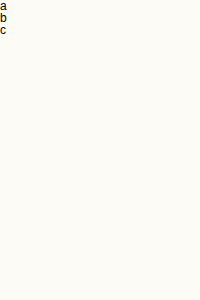
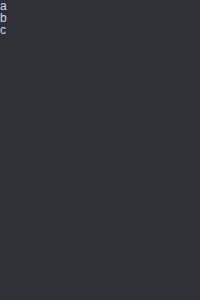
Here dm.items.addGroups(1, 1, ["picked"]) puts row 1 ("b") into the picked group, and filterOnGroup: "picked" makes the ListView show only that row.
XmlListModel
XmlListModel and XmlListModelRole require import QtQml.XmlListModel. An XmlListModel is a read-only model of an XML document. Its query selects the elements that become rows, and each XmlListModelRole gives a name and reads either a child element's text (elementName) or an attribute (attributeName).
XmlListModel provides source, query, roles, count, progress, status (XmlListModel.Null, Ready, Loading, or Error), reload(), and errorString(). Setting source loads the document and replaces any rows from a previous source; for a local document, status becomes Loading at once and then Ready when its rows are populated.
With a feed.xml file beside Main.qml:
feed.xml
XML
Copy
<rss><channel>
<item id="a1"><title>First</title></item>
<item id="a2"><title>Second</title></item>
</channel></rss>
XML
Copy
<rss><channel>
<item id="a1"><title>First</title></item>
<item id="a2"><title>Second</title></item>
</channel></rss>
Edit
Source
What this example draws
Nothing drawn yet.
Once the file loads, two rows appear: "a1 First" and "a2 Second".
Be aware of how XmlListModel handles missing data, bad queries, and document limits:
A query that does not start with / logs a warning and leaves the model Loading with no rows.
A missing local source file produces an empty model with status Ready, and a query that matches nothing is also Ready and empty. A failed network fetch sets status to Error, and errorString() explains why.
A role that an element does not have reads as empty text ("").
If an XML document is malformed part-way through, the model keeps the rows already read, becomes Ready, and logs Query error. An unknown XML entity also stops reading at that point: the model becomes Ready with the rows read up to the entity, and later rows are ignored.
An XML document is capped at 16 MiB (whether from a file, fetch, or registered resource); above that, the model becomes Error and keeps its old rows. XML nesting deeper than 128 levels sets the model to Error with no rows, even when the query matches nothing.
JsonListModel
JsonListModel requires import Ljos.Models. It is Ljós's own type. It is a read-only model of a JSON array of objects, read from the text of json or from the file or URL of source, relative to the QML file. If both are set, source wins. It works wherever a model does: ListView, GridView, Repeater and TableView.
JsonListModel provides json, source, count, roles, status (JsonListModel.Null, Ready, Loading, or Error), error, get(i), and reload().
With a rows.json file beside Main.qml:
rows.json
JSON
Copy
[{"name": "Bread", "price": 3.5}, {"name": "Honey"}]
JSON
Copy
[{"name": "Bread", "price": 3.5}, {"name": "Honey"}]
Edit
Source
What this example draws
Nothing drawn yet.
The roles are every key of every row, in the order they first appear. A key a row does not have reads as undefined, and a JSON null reads as null.
When the data changes, the model says only what differs, so delegates of unchanged rows stay as they are:
Equal rows at the start and end of the list are left alone.
A row between them at the same index gets dataChanged, naming only the roles that differ.
Rows left over are inserted or removed after that. A row that moved is not recognised: it reads as a change at each index it passes.
A new key is added to roles. When no row has a key any more, the model resets.
Be aware of how JsonListModel handles bad data and reading again:
JSON that cannot be used, or a file that cannot be read, keeps the rows, sets status to Error and error to the reason with its line and column, and logs it. The next good read clears it.
Under ljos run --watch, a saved source file is read again after the quiet time, with no reload of the QML and no Loading status. Elsewhere, call reload(): nothing polls a file.
A document is capped at 64 MiB.
FolderListModel
FolderListModel requires import Qt.labs.folderlistmodel. It is a read-only model of the files and folders in folder, read in the background (status moves from Loading to Ready, or is Null if the folder does not exist). Each row exposes the roles fileName, fileBaseName, fileSuffix, filePath, fileUrl, fileModified, and fileIsDir.
You can configure filtering and sorting with folder, rootFolder, parentFolder, nameFilters, showDirs, showDirsFirst, showDotAndDotDot, showFiles, showHidden, showOnlyReadable, caseSensitive, sortCaseSensitive, sortField (FolderListModel.Unsorted, Name, Time, Size, or Type), and sortReversed. To inspect rows from script, use count, status, get(row, role), indexOf(url), and isFolder(row).
The example below lists the pictures beside its own file. Qt.resolvedUrl(".") is the folder that file is in, so the model shows a row for logo.svg and one for photo.jpg wherever the example runs, and leaves out Main.qml because it matches no filter:

Main.qml
QML
Copy
import QtQuick
import Qt.labs.folderlistmodel

Column {
    spacing: 4
    FolderListModel {
        id: files
        folder: Qt.resolvedUrl(".")
        nameFilters: ["*.jpg", "*.svg"]
        showDirs: false
    }
    Repeater {
        model: files
        Row {
            required property string fileName
            required property url fileUrl
            spacing: 8
            // The name beside it says what the picture is.
            Image {
                width: 32
                height: 32
                fillMode: Image.PreserveAspectFit
                source: fileUrl
                Accessible.ignored: true
            }
            Text {
                anchors.verticalCenter: parent.verticalCenter
                color: palette.windowText
                text: fileName
            }
        }
    }
}
Edit
Source
What this example draws
Nothing drawn yet.
Keep these details in mind when filtering folders:
Entries whose names start with a dot are hidden unless showHidden is true.
nameFilters apply only to files, so folders are still listed regardless of their names unless you set showDirs: false.
Setting folder to a directory that does not exist empties the model and sets status to FolderListModel.Null.
Limits and edge cases
On DelegateModel, rootIndex and parts are not built, nor are DelegateModelGroup's get, create, and resolve methods, or the attached properties named after each group. Ljós has no Package type for parts. In addition, a delegate of a filtered DelegateModel does not carry the index of its row in the underlying model.
XmlListModel enforces fixed resource limits that are specific to Ljós: 16 MiB per document, 128 levels of nesting, 10,000 rows, 100,000 cells, 1 MiB per value, and 8 MiB of copied text.
The XML parser stops at an unknown entity and does not expand custom entities.
See also
Models in QML
Feed rows of data into views and repeaters with ListModel, numbers, arrays, ObjectModel, DelegateModel, XmlListModel, JsonListModel, and FolderListModel.
Models supply rows of data to views and repeaters. You use ListModel when you want a mutable table of rows with named roles, plain numbers or arrays for simple lists, ObjectModel when the visual items already exist, DelegateModel when you want to bundle a model with its delegate and filter rows by group, XmlListModel to read XML documents, JsonListModel to read JSON, and FolderListModel to list files and folders on disk.
ListModel and ListElement
ListModel and ListElement come from import Ljos.Models. A ListModel holds rows; each ListElement is a row, and its properties are the row's roles. In a delegate, you read a role by its name, through model.<role>, or as a required property of the same name.
You can inspect and change rows at runtime with count, get(i), index(row, column), append, insert(i, object), remove(i, count) (where count defaults to one), move(from, to, n), set(i, object), setProperty(i, role, value), and clear().
get(i) returns the row as a live object: writing one of its roles changes the row in the model. Reading a row that is not there gives undefined.
append takes either one object or an array of objects.
set(i, object) replaces only the roles the object names. Calling set at the end of the model appends a row.
A ListModel emits a signal for each change: setProperty emits dataChanged with the role, append and insert signal that rows are about to be inserted and then emit rowsInserted, remove and clear emit rowsRemoved, move emits rowsMoved, and row count changes emit countChanged.
Main.qml
QML
Copy
What this example draws
Edit
Source
import Ljos.Ui
import Ljos.Core
import Ljos.Models
import Ljos.Layout

Item {
    width: 200
    height: 100

    ListModel {
        id: fruit
        ListElement { name: "apple"; cost: 1.5 }
        ListElement { name: "pear"; cost: 2 }
    }

    Column {
        Repeater {
            model: fruit
            Text {
                required property string name
                required property real cost
                color: palette.windowText
                text: name + " " + cost
            }
        }
    }

    Component.onCompleted: {
        fruit.append({ name: "fig", cost: 3 })
        fruit.setProperty(1, "cost", 2.5)
        fruit.remove(0)
    }
}
Show all 33 lines
On load, apple is removed, leaving "pear 2.5" and "fig 3".
Keep these pitfalls in mind when working with ListModel:
A role keeps the type of its first value. If you call set with a value of another type, the change is refused, logs Can't assign to existing role 'name' of different type [Number -> String], and the role keeps its previous value.
A role that only a later row defines is undefined in earlier rows.
Calls outside the rows (such as an index past the end, or a move out of range) log a warning and change nothing.
ListModel keeps a deep copy of any object passed to append, insert, or set, so later changes to your original JavaScript object do not reach the rows. Each read of a nested object returns a new copy, and a function in the object does not become a role.
Numbers, strings, arrays, and object lists
You do not always need a ListModel. You can pass simpler values directly as a model:
A number N is a model of N rows whose modelData runs from 0 to N - 1.
An array gives one row per element, and a string gives one row per character.
A list of QtObject items is a model whose rows are those objects; each property of an item is a role of its row, and changing the property updates the delegate.
An array of plain JavaScript objects gives each delegate modelData (so modelData.n reads a member, whilst model.n is undefined), or you can declare required property members matching the object keys.
Main.qml
QML
Copy
What this example draws
Edit
Source
import Ljos.Ui
import Ljos.Layout

Column {
    Repeater {
        model: 2
        Text { text: "number " + modelData; color: palette.windowText }
    }
    Repeater {
        model: ["x", "y"]
        Text { text: "array " + modelData; color: palette.windowText }
    }
    Repeater {
        model: "abc"
        Text { text: "letter " + modelData; color: palette.windowText }
    }
    Repeater {
        model: [{ n: "u" }, { n: "v" }]
        Text { text: "object " + modelData.n; color: palette.windowText }
    }
}
Show all 21 lines
When a delegate of an array of objects uses required property declarations, the role names come from the first row:
Main.qml
QML
Copy
What this example draws
Edit
Source
import Ljos.Ui
import Ljos.Layout

Column {
    property unknown days: [{ day: 5, on: true }, { day: 6 }, 7]
    Repeater {
        model: days
        Text {
            required property int day
            required property bool on
            color: palette.windowText
            text: "day " + day + (on ? " on" : " off")
        }
    }
}
Watch out for these edge cases with value and array models:
null, undefined, and 0 give no rows. A negative number gives no rows and logs Model size of -2 is less than 0.
Without a delegate, a Repeater makes nothing, and a view with a model and no delegate has no rows.
In an array of objects read via required properties, a row lacking one of the first row's properties gets that type's default value (in the example above, the third row is 7, which has no day or on member, so it reads "day 0 off"). Writing to such a required property changes the delegate only, not the array.
On other models, if a delegate declares a required property and no role of that name exists, that delegate is not created and logs Required property missing was not initialized.
ObjectModel and DelegateModel
Both ObjectModel and DelegateModel come from import Ljos.Models.
An ObjectModel holds visual items that already exist. A view places each item at its row position and creates no delegate for it. You can read and change its rows with count, children, get, append, insert, move, remove, clear, and countChanged.
Main.qml
QML
Copy
What this example draws
Edit
Source
import Ljos.Ui
import Ljos.Core
import Ljos.Models

Item {
    width: 200
    height: 300

    ObjectModel {
        id: rows
        Rectangle { width: 200; height: 20; fill: palette.accent }
        Rectangle { width: 200; height: 40; fill: palette.linkVisited }
        Rectangle { width: 200; height: 60; fill: palette.windowText }
    }

    ListView {
        anchors.fill: parent
        model: rows
    }
}
Show all 20 lines
The three rectangles appear at y positions 0, 20, and 60.
A DelegateModel packages a model together with the delegate for its rows. Assigning a new model to it replaces the rows. It provides count, an items group containing all rows by default, a persistedItems group that starts empty, custom groups of type DelegateModelGroup, and filterOnGroup to restrict which group a view displays.
Each DelegateModelGroup has name, includeByDefault, count, addGroups, removeGroups, setGroups, remove, move, and insert. Inside a delegate, you can read the attached properties DelegateModel.model, DelegateModel.groups, DelegateModel.isUnresolved, DelegateModel.inItems, DelegateModel.inPersistedItems, DelegateModel.itemsIndex, and DelegateModel.persistedItemsIndex.
Main.qml
QML
Copy
What this example draws
Edit
Source
pragma Scripts: JavaScript
import Ljos.Ui
import Ljos.Core
import Ljos.Models

Item {
    width: 200
    height: 300

    ListModel {
        id: lm
        ListElement { name: "a" }
        ListElement { name: "b" }
        ListElement { name: "c" }
    }

    DelegateModel {
        id: dm
        model: lm
        groups: [ DelegateModelGroup { id: picked; name: "picked" } ]
        delegate: Text {
            required property string name
            color: palette.windowText
            text: name
        }
    }

    ListView {
        anchors.fill: parent
        model: dm
    }

    Component.onCompleted: {
        dm.items.addGroups(1, 1, ["picked"])
        dm.filterOnGroup = "picked"
    }
}
Show all 37 lines
Here dm.items.addGroups(1, 1, ["picked"]) puts row 1 ("b") into the picked group, and filterOnGroup: "picked" makes the ListView show only that row.
XmlListModel
XmlListModel and XmlListModelRole require import QtQml.XmlListModel. An XmlListModel is a read-only model of an XML document. Its query selects the elements that become rows, and each XmlListModelRole gives a name and reads either a child element's text (elementName) or an attribute (attributeName).
XmlListModel provides source, query, roles, count, progress, status (XmlListModel.Null, Ready, Loading, or Error), reload(), and errorString(). Setting source loads the document and replaces any rows from a previous source; for a local document, status becomes Loading at once and then Ready when its rows are populated.
With a feed.xml file beside Main.qml:
feed.xml
XML
Copy
<rss><channel>
<item id="a1"><title>First</title></item>
<item id="a2"><title>Second</title></item>
</channel></rss>
XML
Copy
What this example draws
Nothing drawn yet.
Edit
Source
<rss><channel>
<item id="a1"><title>First</title></item>
<item id="a2"><title>Second</title></item>
</channel></rss>
Once the file loads, two rows appear: "a1 First" and "a2 Second".
Be aware of how XmlListModel handles missing data, bad queries, and document limits:
A query that does not start with / logs a warning and leaves the model Loading with no rows.
A missing local source file produces an empty model with status Ready, and a query that matches nothing is also Ready and empty. A failed network fetch sets status to Error, and errorString() explains why.
A role that an element does not have reads as empty text ("").
If an XML document is malformed part-way through, the model keeps the rows already read, becomes Ready, and logs Query error. An unknown XML entity also stops reading at that point: the model becomes Ready with the rows read up to the entity, and later rows are ignored.
An XML document is capped at 16 MiB (whether from a file, fetch, or registered resource); above that, the model becomes Error and keeps its old rows. XML nesting deeper than 128 levels sets the model to Error with no rows, even when the query matches nothing.
JsonListModel
JsonListModel requires import Ljos.Models. It is Ljós's own type. It is a read-only model of a JSON array of objects, read from the text of json or from the file or URL of source, relative to the QML file. If both are set, source wins. It works wherever a model does: ListView, GridView, Repeater and TableView.
JsonListModel provides json, source, count, roles, status (JsonListModel.Null, Ready, Loading, or Error), error, get(i), and reload().
With a rows.json file beside Main.qml:
rows.json
JSON
Copy
[{"name": "Bread", "price": 3.5}, {"name": "Honey"}]
JSON
Copy
What this example draws
Nothing drawn yet.
Edit
Source
[{"name": "Bread", "price": 3.5}, {"name": "Honey"}]
The roles are every key of every row, in the order they first appear. A key a row does not have reads as undefined, and a JSON null reads as null.
When the data changes, the model says only what differs, so delegates of unchanged rows stay as they are:
Equal rows at the start and end of the list are left alone.
A row between them at the same index gets dataChanged, naming only the roles that differ.
Rows left over are inserted or removed after that. A row that moved is not recognised: it reads as a change at each index it passes.
A new key is added to roles. When no row has a key any more, the model resets.
Be aware of how JsonListModel handles bad data and reading again:
JSON that cannot be used, or a file that cannot be read, keeps the rows, sets status to Error and error to the reason with its line and column, and logs it. The next good read clears it.
Under ljos run --watch, a saved source file is read again after the quiet time, with no reload of the QML and no Loading status. Elsewhere, call reload(): nothing polls a file.
A document is capped at 64 MiB.
FolderListModel
FolderListModel requires import Qt.labs.folderlistmodel. It is a read-only model of the files and folders in folder, read in the background (status moves from Loading to Ready, or is Null if the folder does not exist). Each row exposes the roles fileName, fileBaseName, fileSuffix, filePath, fileUrl, fileModified, and fileIsDir.
You can configure filtering and sorting with folder, rootFolder, parentFolder, nameFilters, showDirs, showDirsFirst, showDotAndDotDot, showFiles, showHidden, showOnlyReadable, caseSensitive, sortCaseSensitive, sortField (FolderListModel.Unsorted, Name, Time, Size, or Type), and sortReversed. To inspect rows from script, use count, status, get(row, role), indexOf(url), and isFolder(row).
The example below lists the pictures beside its own file. Qt.resolvedUrl(".") is the folder that file is in, so the model shows a row for logo.svg and one for photo.jpg wherever the example runs, and leaves out Main.qml because it matches no filter:
Main.qml
QML
Copy
What this example draws
Nothing drawn yet.
Edit
Source
import QtQuick
import Qt.labs.folderlistmodel

Column {
    spacing: 4
    FolderListModel {
        id: files
        folder: Qt.resolvedUrl(".")
        nameFilters: ["*.jpg", "*.svg"]
        showDirs: false
    }
    Repeater {
        model: files
        Row {
            required property string fileName
            required property url fileUrl
            spacing: 8
            // The name beside it says what the picture is.
            Image {
                width: 32
                height: 32
                fillMode: Image.PreserveAspectFit
                source: fileUrl
                Accessible.ignored: true
            }
            Text {
                anchors.verticalCenter: parent.verticalCenter
                color: palette.windowText
                text: fileName
            }
        }
    }
}
Show all 33 lines
Keep these details in mind when filtering folders:
Entries whose names start with a dot are hidden unless showHidden is true.
nameFilters apply only to files, so folders are still listed regardless of their names unless you set showDirs: false.
Setting folder to a directory that does not exist empties the model and sets status to FolderListModel.Null.
Limits and edge cases
On DelegateModel, rootIndex and parts are not built, nor are DelegateModelGroup's get, create, and resolve methods, or the attached properties named after each group. Ljós has no Package type for parts. In addition, a delegate of a filtered DelegateModel does not carry the index of its row in the underlying model.
XmlListModel enforces fixed resource limits that are specific to Ljós: 16 MiB per document, 128 levels of nesting, 10,000 rows, 100,000 cells, 1 MiB per value, and 8 MiB of copied text.
The XML parser stops at an unknown entity and does not expand custom entities.
See also