


Pointer Input and Gestures
Handle clicks, taps, drags, hover, wheel turns, pinches, touch
points, and drag-and-drop with PointerArea, gestures, PinchArea,
MultiPointTouchArea, and DropArea.
You can handle pointer and touch input either with area items (
PointerArea, PinchArea, and DropArea) or with lightweight gestures (Tap, Drag, Pointer, Hover, and Wheel) declared inside any visual item. Give interactive items an Accessible.name so screen readers can announce them and ljos check does not warn about unnamed interactive controls.The topmost enabled
PointerArea under the pointer receives a click, with event coordinates (mouseX, or the event's position) reported in that PointerArea's own coordinate system. If a PointerArea is disabled or sets event.accepted = false on a press, the press passes through to any PointerArea underneath it.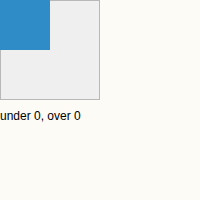
The second
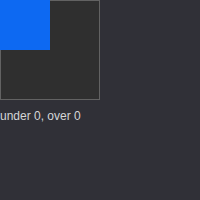
PointerArea, the highlighted square, sits on top of the first, so clicking inside (0..50, 0..50) increments over, while clicking elsewhere in the 100×100 square increments under; the line below counts both.PointerArea also provides onPressed, onReleased, pressedButtons, acceptedButtons, containsMouse, and hoverEnabled:With
hoverEnabled: true, moving the pointer into the area emits entered followed by a position change; moving within the area emits only position changes; moving out emits exited at the last position inside.Pressing a mouse button that nothing accepts does not end hover. Dragging outside while pressed emits
exited before position changes continue, dragging back inside emits entered, and releasing outside leaves the area unhovered.A gesture recognises input on the item it is declared in, without a separate child item that owns geometry:
Tap emits tapped and singleTapped on a tap, and doubleTapped when a second tap arrives shortly after the first. Its default GesturePolicy does not block a PointerArea beneath it.Drag watches a press without grabbing immediately: a move shorter than the system drag threshold does not start a drag, whereas a move past the threshold grabs the pointer and moves target (defaulting to its parent item). While dragging, active is true, centroid tracks the pointer, and translation reports the current drag delta before resetting to zero on release (while persistent translation accumulates across drags). If you disable an axis (xAxis or yAxis), drags along that axis will not start, and target stops at the axis's maximum.Pointer becomes active immediately on press, exposing point in its item's coordinates and translation as the pointer moves; releasing clears point while keeping translation, and does not block a tap on the same item.

A tap sets
box.tapped, and its fill follows: the highlight colour after a tap, palette.linkVisited after a double tap, both from the palette of the reader's colour scheme, and dragging moves box down up to yAxis.maximum: 150.Note the subtle difference in drag threshold timing:
Drag starts dragging on the first move that reaches the system drag distance, whereas PointerArea starts dragging on the move after passing the threshold.A
Hover tracks whether the pointer is over its parent item through hovered, point, and active. A PointerArea stacked above the item does not hide hover from a Hover.A
Wheel accumulates mouse wheel turns in rotation (where one standard wheel notch is 15 degrees), scales adjustments via rotationScale when a target property is configured, and stays active until timeout expires after the last wheel turn. Without a target property configured, a Wheel simply accumulates vertical (or horizontal) turns in rotation.
To build internal drag-and-drop interactions, attach
DragSource (DragSource.active, DragSource.hotSpot.x, DragSource.hotSpot.y, DragSource.keys, DragSource.proposedAction, DragSource.dragType, and DragSource.drop()) to the dragged item, and place a DropArea (containsDrag, keys, and the signals entered, exited, and dropped) where items can be dropped.

When
DragSource.active becomes true while the item's DragSource.hotSpot is already inside a DropArea, entered fires immediately; if the drag starts outside and moves in later, entered fires when the hot spot crosses into the DropArea.Moving out of the
DropArea or setting DragSource.active = false emits exited.Calling
DragSource.drop() inside a DropArea emits dropped (the drag event carries DragSource.proposedAction) without emitting exited.A
PinchArea scales its pinch.target between pinch.minimumScale and pinch.maximumScale, emitting pinchStarted, pinchUpdated, and pinchFinished. If both scale limits are set to 1, the target keeps its scale unchanged.

A
MultiPointTouchArea follows every finger on it, each as a TouchPoint with its x, y, startX, previousX, sceneX, pressed and pressure. In each touch event it emits released, canceled, updated (every point still down, still ones too) and pressed for the points concerned, then touchUpdated with every point down. gestureStarted comes first while a point is more than gesture.dragThreshold from where it came down; call gesture.grab() to stop it. Points declared in touchPoints go to fingers in order, and later fingers get points the area makes.An event is taken only while the number of fingers in it is from
minimumTouchPoints to maximumTouchPoints. While mouseEnabled (the default), the left mouse button is one more point; otherwise the mouse goes to what is under the area.A
MultiPointTouchArea inside a Flickable keeps its fingers even when no handler grabs the gesture; Qt would let the Flickable take them.A finger on a
MultiPointTouchArea under a TapHandler, DragHandler or PointHandler that only watches the point (a TapHandler's default DragThreshold policy) goes to the area alone; Qt gives it to both. A handler that grabs, such as a TapHandler with WithinBounds, has the finger.On macOS and Windows, dragging out of the application window to external applications is not supported because
winit 0.30.13 provides no API to initiate an OS drag session; drags stay within the window.Wheel.margin is stored as a property but has no effect on hit testing.