
Elegant
Step by step with the pipe
Hand a value from step to step with |>, where % is what the step before gave, so a calculation reads in the order it runs.
After reading this page, you will be able to write a calculation as steps that read in the order they run, use % for the value a step is given, pipe into a match, and read what the parser says about a pipe it cannot take.
The pipe is TC39's pipe proposal, its Hack form, with % as the topic. Ljós adds no syntax of its own: a script is TypeScript, and a pipe is compiled away into plain TypeScript before anything else reads it.
Reading in the order it runs
head |> body works out head, then gives the value of body, where % in the body is what the head gave. A chain hands each value on: a |> f(%) |> g(%) is g(f(a)), written in the order it runs.
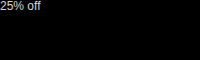
A discount, kept at zero or more, as a share of the old price, rounded:

Main.qml
QML
Copy
import Ljos.Ui
import Ljos.Core

Window {
    color: palette.window
    width: 200
    height: 60
    visible: true

    property real oldPrice: 40
    property real newPrice: 30

    readonly property real discountPercent:
        oldPrice - newPrice |> Math.max(%, 0) / oldPrice * 100 |> Math.round(%)

    Text {
        color: palette.windowText
        text: t`${discountPercent}% off`
    }
}
Edit
Source
What this example draws
Written inside out, the same binding is Math.round(Math.max(oldPrice - newPrice, 0) / oldPrice * 100), and its first step is the last thing you read.
What a step can be
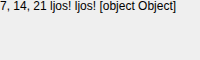
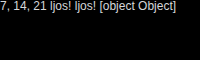
A step is any expression that uses %: a call, a method, an operator, a template, an array. The head is worked out once, however many times the step reads %.
Main.qml
QML
Copy
import Ljos.Ui

Window {
    color: palette.window
    width: 200
    height: 60
    visible: true

    property int count: 7

    readonly property string listed: [1, 2, 3] |> %.map(n => n * count) |> %.join(", ")
    readonly property string shouted: "ljos" |> `${%}!` |> [%, %].join(" ")
    readonly property int left: count |> % + 1 |> % % 3

    Text {
        color: palette.windowText
        text: `${listed} ${shouted} ${left}`
    }
}
Edit
Source
What this example draws
In % % 3, the first % is the topic and the second is the remainder: where an operand goes, % is the topic; between two operands, it is the operator it always was.
A step that is an arrow function, a conditional, an assignment or a yield is written in parentheses, so it cannot be read as part of the pipe around it:
Main.qml
QML
Copy
import Ljos.Ui

Rectangle {
    fill: palette.window
    width: 200
    height: 60

    property real level: -3
    property real shown: 0

    readonly property real kept: level |> (% > 0 ? % : 0)

    Tap {
        onTapped: level |> (shown = % * 2)
    }
}
Edit
Source
What this example draws
A pipe inside a step
A pipe inside a step has its own % for its own steps; its head reads the outer one. A function inside a step that reads % keeps the value it saw.
Main.qml
QML
Copy
import Ljos.Ui

Window {
    color: palette.window
    width: 200
    height: 60
    visible: true

    readonly property int nested: 3 |> (% + 1 |> % * 10) + %
    readonly property string kept: [1, 2, 3].map(n => n |> (() => % * 10)) |> %.map(f => f()).join(",")

    Text {
        color: palette.windowText
        text: `${nested} ${kept}`
    }
}
Edit
Source
What this example draws
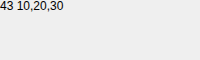
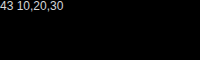
nested is 43: the inner pipe gives (3 + 1) * 10, and the outer % is still 3.
Piping into a match
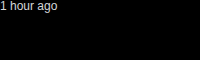
A pipe hands a match its subject, and the arms read % (see Pattern matching). How long ago an article came out, in minutes, chosen among guards:
Main.qml
QML
Copy
import Ljos.Ui
import Ljos.Core

Window {
    color: palette.window
    width: 200
    height: 60
    visible: true

    property string published: "2026-01-01T12:00"
    property real now: Date.parse("2026-01-01T13:30")

    function timeSinceEvent(published: string, now: number): string {
        return (now - Date.parse(published)) / 60000 |> Math.floor(%) |> match (%) {
            when if (% < 2): t`Just now`;
            when if (% < 60): t`${%} minutes ago`;
            when if (% < 120): t`1 hour ago`;
            when if (% < 1440): Math.floor(% / 60) |> t`${%} hours ago`;
            default: Locale.current.formatDate(published, "yyyy-MM-dd");
        }
    }

    Text {
        color: palette.windowText
        text: timeSinceEvent(published, now)
    }
}
Edit
Source
What this example draws
The translated strings carry their number as %1, so a translator can put it where the language wants it.
Waiting in a step
A step may await, in an async function, and the steps still run in order:
sizes.lts
TypeScript
Copy
export async function doubled(size: Promise<number>): Promise<string> {
    return await size |> % * 2 |> `${%} px`
}
TypeScript
Copy
export async function doubled(size: Promise<number>): Promise<string> {
    return await size |> % * 2 |> `${%} px`
}
Edit
Source
What this example draws
Where you can write it
A pipe goes in the scripts of a QML file of Ljós's own API (bindings, handlers and functions), and in an .lts module. A .ts module stays plain TypeScript, so that stock TypeScript tools read it as they read any other; a pipe in one is the error ts-lts-syntax, and ljos migrate --write renames the file to .lts and rewrites every import that names it:
Text
Copy
size.ts:2:12: error: `|>` is Ljós syntax, which stock TypeScript tools cannot read in a `.ts` file; rename `size.ts` to `size.lts` [ts-lts-syntax]
Types
The checker types % as the head and each step as its body, so a mistake is reported where it is made:
Text
Copy
Card.qml:3:55: error: `rest` is a number; this gives it a string [ts-assign-type]
What the parser says
The proposal's rules are errors that say so:
Text
Copy
Card.qml:4:42: error: the pipe's body does not use its topic `%` [syntax]
Card.qml:6:37: error: `%` is the topic of a pipe's body, and there is no pipe here: write it after `|>`, as in `x |> f(%)` [syntax]
Card.qml:5:42: error: a conditional as a pipe's body is written in parentheses: `|> (% > 0 ? % : 0)` [syntax]
The proposal's possible future additions, such as |>>, |?> and +>, are not in it.
Step by step with the pipe
Hand a value from step to step with |>, where % is what the step before gave, so a calculation reads in the order it runs.
After reading this page, you will be able to write a calculation as steps that read in the order they run, use % for the value a step is given, pipe into a match, and read what the parser says about a pipe it cannot take.
The pipe is TC39's pipe proposal, its Hack form, with % as the topic. Ljós adds no syntax of its own: a script is TypeScript, and a pipe is compiled away into plain TypeScript before anything else reads it.
Reading in the order it runs
head |> body works out head, then gives the value of body, where % in the body is what the head gave. A chain hands each value on: a |> f(%) |> g(%) is g(f(a)), written in the order it runs.
A discount, kept at zero or more, as a share of the old price, rounded:
Main.qml
QML
Copy
What this example draws
Edit
Source
import Ljos.Ui
import Ljos.Core

Window {
    color: palette.window
    width: 200
    height: 60
    visible: true

    property real oldPrice: 40
    property real newPrice: 30

    readonly property real discountPercent:
        oldPrice - newPrice |> Math.max(%, 0) / oldPrice * 100 |> Math.round(%)

    Text {
        color: palette.windowText
        text: t`${discountPercent}% off`
    }
}
Show all 20 lines
Written inside out, the same binding is Math.round(Math.max(oldPrice - newPrice, 0) / oldPrice * 100), and its first step is the last thing you read.
What a step can be
A step is any expression that uses %: a call, a method, an operator, a template, an array. The head is worked out once, however many times the step reads %.
Main.qml
QML
Copy
What this example draws
Edit
Source
import Ljos.Ui

Window {
    color: palette.window
    width: 200
    height: 60
    visible: true

    property int count: 7

    readonly property string listed: [1, 2, 3] |> %.map(n => n * count) |> %.join(", ")
    readonly property string shouted: "ljos" |> `${%}!` |> [%, %].join(" ")
    readonly property int left: count |> % + 1 |> % % 3

    Text {
        color: palette.windowText
        text: `${listed} ${shouted} ${left}`
    }
}
Show all 19 lines
In % % 3, the first % is the topic and the second is the remainder: where an operand goes, % is the topic; between two operands, it is the operator it always was.
A step that is an arrow function, a conditional, an assignment or a yield is written in parentheses, so it cannot be read as part of the pipe around it:

Main.qml
QML
Copy
What this example draws
Edit
Source
import Ljos.Ui

Rectangle {
    fill: palette.window
    width: 200
    height: 60

    property real level: -3
    property real shown: 0

    readonly property real kept: level |> (% > 0 ? % : 0)

    Tap {
        onTapped: level |> (shown = % * 2)
    }
}
Show all 16 lines
A pipe inside a step
A pipe inside a step has its own % for its own steps; its head reads the outer one. A function inside a step that reads % keeps the value it saw.
Main.qml
QML
Copy
What this example draws
Edit
Source
import Ljos.Ui

Window {
    color: palette.window
    width: 200
    height: 60
    visible: true

    readonly property int nested: 3 |> (% + 1 |> % * 10) + %
    readonly property string kept: [1, 2, 3].map(n => n |> (() => % * 10)) |> %.map(f => f()).join(",")

    Text {
        color: palette.windowText
        text: `${nested} ${kept}`
    }
}
Show all 16 lines
nested is 43: the inner pipe gives (3 + 1) * 10, and the outer % is still 3.
Piping into a match
A pipe hands a match its subject, and the arms read % (see Pattern matching). How long ago an article came out, in minutes, chosen among guards:

Main.qml
QML
Copy
What this example draws
Edit
Source
import Ljos.Ui
import Ljos.Core

Window {
    color: palette.window
    width: 200
    height: 60
    visible: true

    property string published: "2026-01-01T12:00"
    property real now: Date.parse("2026-01-01T13:30")

    function timeSinceEvent(published: string, now: number): string {
        return (now - Date.parse(published)) / 60000 |> Math.floor(%) |> match (%) {
            when if (% < 2): t`Just now`;
            when if (% < 60): t`${%} minutes ago`;
            when if (% < 120): t`1 hour ago`;
            when if (% < 1440): Math.floor(% / 60) |> t`${%} hours ago`;
            default: Locale.current.formatDate(published, "yyyy-MM-dd");
        }
    }

    Text {
        color: palette.windowText
        text: timeSinceEvent(published, now)
    }
}
Show all 27 lines
The translated strings carry their number as %1, so a translator can put it where the language wants it.
Waiting in a step
A step may await, in an async function, and the steps still run in order:

sizes.lts
TypeScript
Copy
export async function doubled(size: Promise<number>): Promise<string> {
    return await size |> % * 2 |> `${%} px`
}
TypeScript
Copy
What this example draws
Edit
Source
export async function doubled(size: Promise<number>): Promise<string> {
    return await size |> % * 2 |> `${%} px`
}
Where you can write it
A pipe goes in the scripts of a QML file of Ljós's own API (bindings, handlers and functions), and in an .lts module. A .ts module stays plain TypeScript, so that stock TypeScript tools read it as they read any other; a pipe in one is the error ts-lts-syntax, and ljos migrate --write renames the file to .lts and rewrites every import that names it:
Text
Copy
size.ts:2:12: error: `|>` is Ljós syntax, which stock TypeScript tools cannot read in a `.ts` file; rename `size.ts` to `size.lts` [ts-lts-syntax]
Types
The checker types % as the head and each step as its body, so a mistake is reported where it is made:
Text
Copy
Card.qml:3:55: error: `rest` is a number; this gives it a string [ts-assign-type]
What the parser says
The proposal's rules are errors that say so:
Text
Copy
Card.qml:4:42: error: the pipe's body does not use its topic `%` [syntax]
Card.qml:6:37: error: `%` is the topic of a pipe's body, and there is no pipe here: write it after `|>`, as in `x |> f(%)` [syntax]
Card.qml:5:42: error: a conditional as a pipe's body is written in parentheses: `|> (% > 0 ? % : 0)` [syntax]
The proposal's possible future additions, such as |>>, |?> and +>, are not in it.