
Elegant
Built with Ljós
Apps that run on Ljós today, recorded as they run. Each capture says what it shows about Ljós, and each app links to its source.
HAL-C2
The Office
A whole floor of agents, drawn and moved by one page of QML
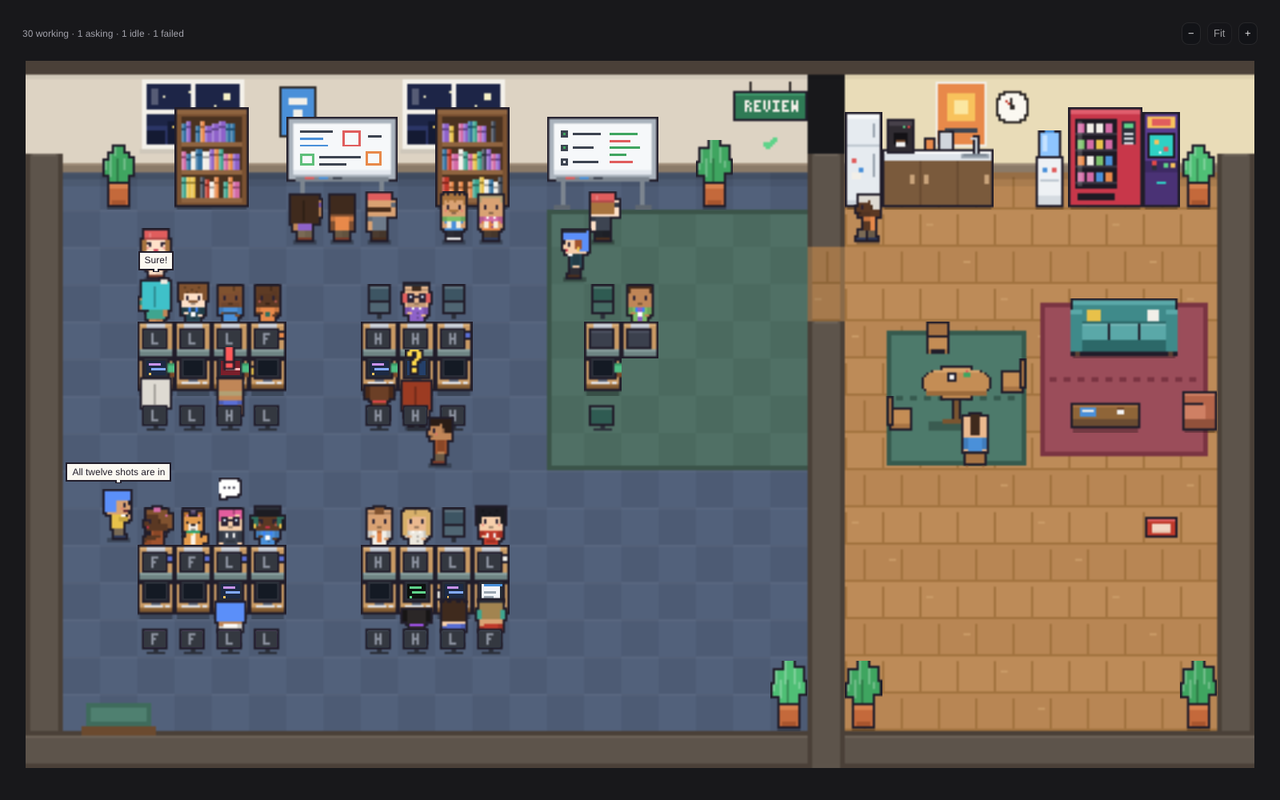
Recording of the Office: people at their desks type and walk over to talk, with speech bubbles, while others wait in the break room.
Recorded running
Pause
HAL-C2 runs coding agents in threads. Its Office plugin seats each thread at a desk as a person in a pixel-art office, with the workers it handed work to beside it.
They type, plan at the whiteboard, read at the bookshelves and wait in the break room. When one agent hands work to another, the two walk over and talk.
The page is HAL-C2's own plugin, loaded at run time and running on Ljós as written.
Recorded off-screen on Linux on 2026-11-21, from HAL-C2 at commit 45ae652. The page is HAL-C2's, unchanged. The threads, projects and lines in it are made up for this recording.
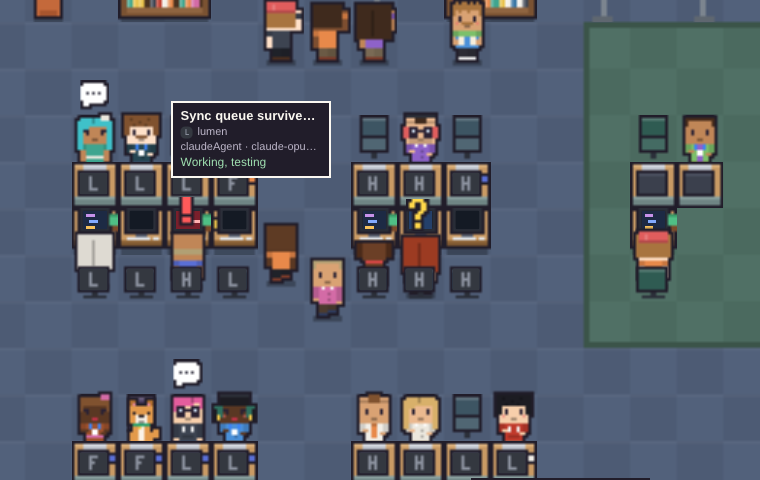
A person's card in the Office, naming the thread, its project, its agent and what it is doing.
Hover a person and its thread's card opens
Pointer input over a scene drawn on Canvas, with the card bound to the thread's data.
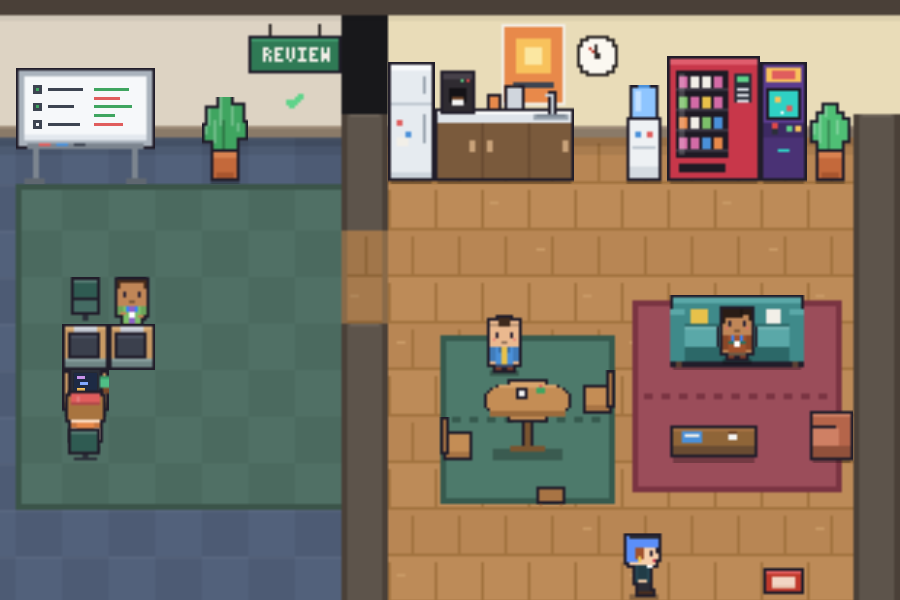
The review corner with two reviewers at their desks, and the break room with a sofa, a table and someone walking in.
The review corner and the break room
Floor, furniture and a sprite sheet per person are painted once into Canvas items, then only moved.
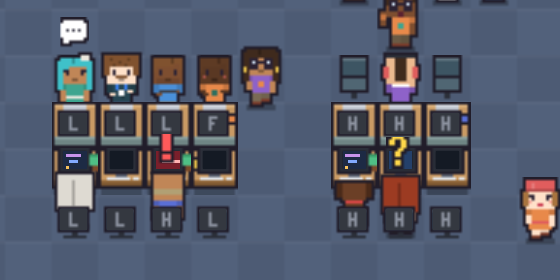
Two desk teams at their screens, an exclamation mark over a thread whose last turn failed and a question mark over one asking for an answer.
A failure and a question, at the desk
The floor is redrawn from what the plugin publishes. One timer moves everyone, and only while the page is shown.
Built on ljos-play
The Office runs on ljos-play, Ljós's game engine for small pixel-art worlds. A world is nested QML objects with bindings; the engine does the clock, the walking and the drawing.
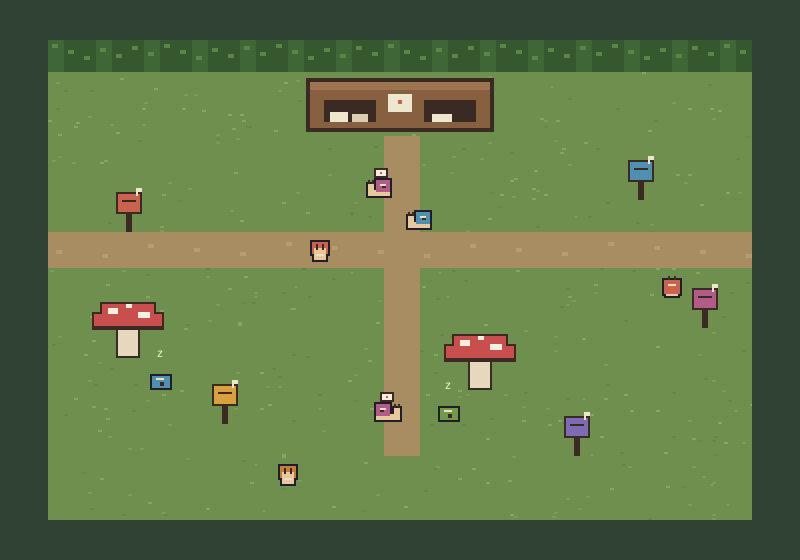
Snail Post, one of ljos-play's examples: snails fetch letters, carry them to the boxes, nap under toadstools and stop to gossip.
A Thing stands on tiles and is drawn in art pixels. Its Spots are where snails go to sort the post.
examples/snail-post/Main.qml
QML
Copy
    // The sorting office: a log with two hatches.
    Thing {
        tx: 8
        ty: 1
        columns: 6
        rows: 2
        solid: true

        Art {
            draw: [
                [1, 3, 94, 27, "#3b2a24"], [3, 5, 90, 23, "#86603f"], [3, 5, 90, 4, "#9c7550"],
                [10, 14, 26, 11, "#3b2a24"], [60, 14, 26, 11, "#3b2a24"],
                [13, 20, 9, 5, "#efe6cf"], [24, 21, 8, 4, "#d8cdb2"], [64, 21, 10, 4, "#efe6cf"],
                [42, 11, 12, 9, "#efe6cf"], [47, 14, 2, 2, "#c9634f"]
            ]
        }
        Spot { kind: "hatch"; tx: 1; ty: 2; face: "up"; pose: "sort" }
        Spot { kind: "hatch"; tx: 4; ty: 2; face: "up"; pose: "sort" }
    }
Each snail does the first Activity whose when is true: nap, deliver or fetch.
examples/snail-post/Main.qml
QML
Copy
            activities: [
                Activity {
                    name: "nap"
                    when: snail.sleepy
                    spot: "shade"
                    stay: [5000, 9000]
                    onEnded: snail.sleepy = false
                },
                Activity {
                    name: "deliver"
                    when: snail.laden
                    spot: "box"
                    stay: 1800
                    onEnded: {
                        snail.laden = false;
                        snail.sleepy = post.rng() < 0.25;
                        if (post.rng() < 0.3)
                            post.gossip(snail);
                    }
                },
                Activity {
                    name: "fetch"
                    spot: "hatch"
                    stay: [1200, 2400]
                    onEnded: snail.laden = true
                }
            ]
Snail Post: snails on a lawn under a hedge, some carrying letters from the sorting log to coloured mailboxes, two napping with a z over them.
Snail Post, running on Ljós
Drawn off-screen by ljos-play's own render task, 30 seconds into the world's time.
Ljós
Ljós Hof
A terminal whose UI is QML, over Ghostty's libghostty-vt
Recording of Hof: at a shell prompt, git log --oneline -8 runs in the ljos-hof checkout, a split opens with ls in the new pane, focus moves between the panes, a new tab opens and closes, and the window returns to its first prompt.
Recorded running
Pause
Hof is a terminal for Linux and macOS. Ghostty's libghostty-vt reads what programs write; everything around it, the tabs, splits, menus and settings, is QML running on Ljós.
It sees Claude Code, Codex, Gemini, Aider and opencode in its panes, and frames a pane whose agent is waiting for you. hof ctl drives it from scripts, and hof mcp lets agents drive it.
Its settings are one TOML file. The settings window writes each change into that file at once and keeps your comments.
Recorded off-screen on Linux on 2026-11-24, from ljos-hof at commit 0fa78e3. The shell, the checkout and the commands in it are real; the window is Hof's own, unchanged.
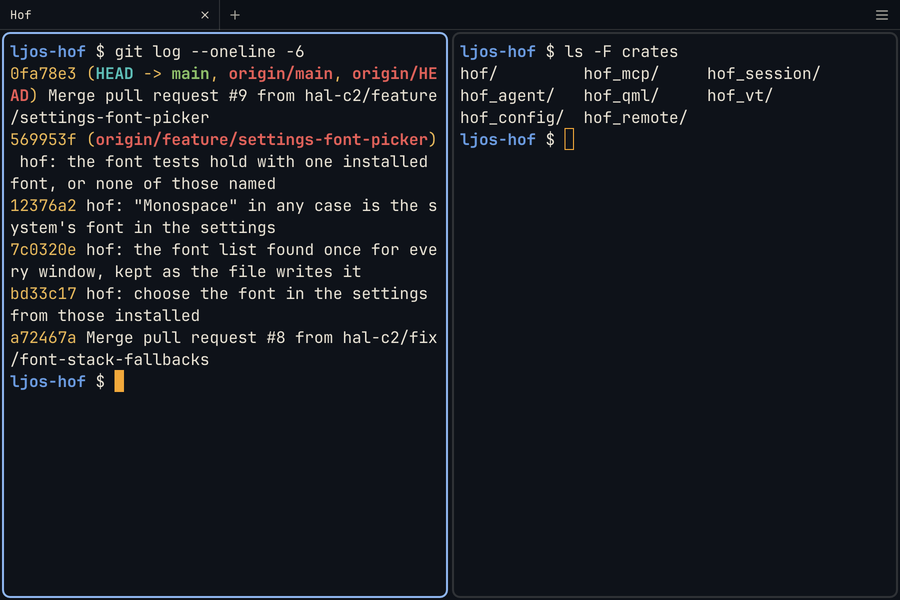
Hof with two panes side by side: git log --oneline -6 on the left inside a blue focus frame, ls -F crates listing the hof crates on the right.
Split panes with the focused one framed
Hof's tabs and splits are a QML UI over Ghostty's libghostty-vt, with the focused pane framed in a highlight colour.
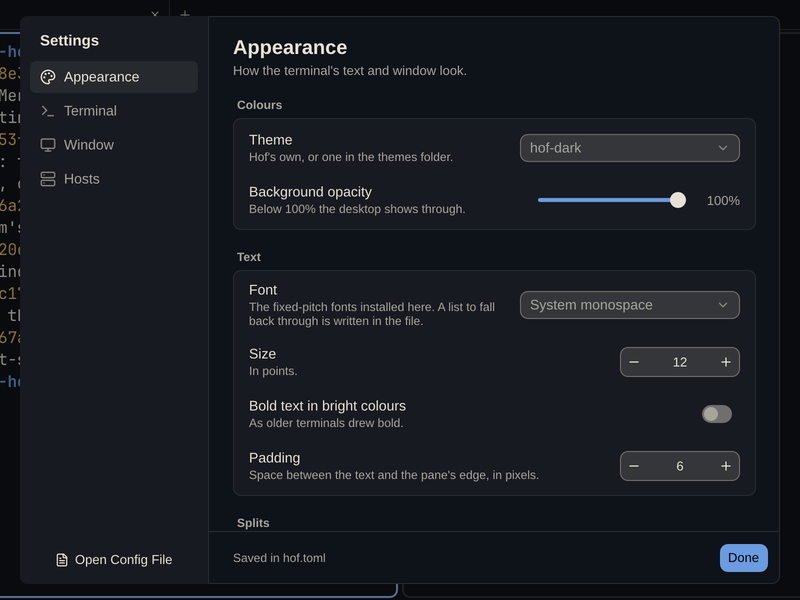
Hof's Settings panel on the Appearance page: theme hof-dark, background opacity 100%, font System monospace at size 12, bold text in bright colours off, padding 6, and 'Saved in hof.toml' beside a Done button.
Settings for theme, opacity, font and padding
Each change is written into the TOML config at once, keeping its comments, and the settings are held to the Ljós design audit.
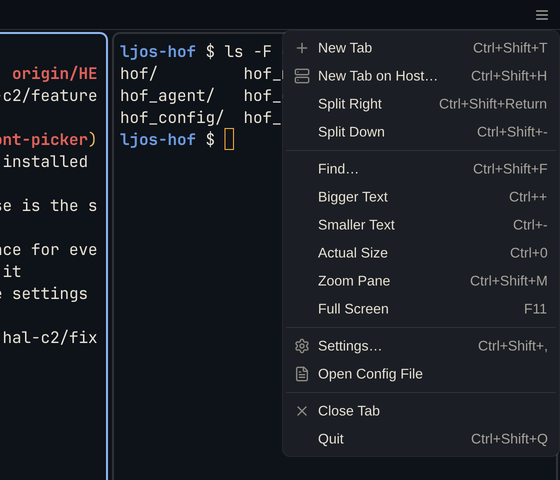
The menu from the button at the right of Hof's tab bar: New Tab, New Tab on Host, Split Right, Split Down, Find, Bigger, Smaller and Actual Size text, Zoom Pane, Full Screen, Settings, Open Config File, Close Tab and Quit, each with its Ctrl+Shift key.
The tab-bar menu with its keys
Off macOS, Hof's actions sit behind a tab-bar button in a menu that shows each key.
Tools built with Ljós
Ljós Studio with a rectangle selected on the canvas: the layers on the left, its properties on the right and its QML under the canvas.
A visual designer where the design is the app’s own QML. A change on the canvas leaves the rest of the file as it was, and agents drive Studio through MCP.
A recipe card for red lentil soup, converted from a web page by Eldur and running on Ljós.
Turns a static HTML, CSS and JavaScript page into a runnable QML app you can read and edit. What it can’t convert, it reports.
HAL-C2’s Appearance settings on Ljós: settings sections down the left, System/Light/Dark color scheme options, and a list of themes with HAL-C2 chosen.
A control surface for the coding agents on your machine, with a terminal, browser tabs and a QML layout you can edit while it runs.
Built with Ljós
Apps that run on Ljós today, recorded as they run. Each capture says what it shows about Ljós, and each app links to its source.
HAL-C2
The Office
A whole floor of agents, drawn and moved by one page of QML
Recording of the Office: people at their desks type and walk over to talk, with speech bubbles, while others wait in the break room.
Recorded running
Pause
HAL-C2 runs coding agents in threads. Its Office plugin seats each thread at a desk as a person in a pixel-art office, with the workers it handed work to beside it.
They type, plan at the whiteboard, read at the bookshelves and wait in the break room. When one agent hands work to another, the two walk over and talk.
The page is HAL-C2's own plugin, loaded at run time and running on Ljós as written.
Recorded off-screen on Linux on 2026-11-21, from HAL-C2 at commit 45ae652. The page is HAL-C2's, unchanged. The threads, projects and lines in it are made up for this recording.
A person's card in the Office, naming the thread, its project, its agent and what it is doing.
Hover a person and its thread's card opens
Pointer input over a scene drawn on Canvas, with the card bound to the thread's data.
The review corner with two reviewers at their desks, and the break room with a sofa, a table and someone walking in.
The review corner and the break room
Floor, furniture and a sprite sheet per person are painted once into Canvas items, then only moved.
Two desk teams at their screens, an exclamation mark over a thread whose last turn failed and a question mark over one asking for an answer.
A failure and a question, at the desk
The floor is redrawn from what the plugin publishes. One timer moves everyone, and only while the page is shown.
Built on ljos-play
The Office runs on ljos-play, Ljós's game engine for small pixel- art worlds. A world is nested QML objects with bindings; the engine does the clock, the walking and the drawing.
Snail Post, one of ljos-play's examples: snails fetch letters, carry them to the boxes, nap under toadstools and stop to gossip.
A Thing stands on tiles and is drawn in art pixels. Its Spots are where snails go to sort the post.
examples/snail-post/Main.qml
QML
Copy
    // The sorting office: a log with two hatches.
    Thing {
        tx: 8
        ty: 1
        columns: 6
        rows: 2
        solid: true

        Art {
            draw: [
                [1, 3, 94, 27, "#3b2a24"], [3, 5, 90, 23, "#86603f"], [3, 5, 90, 4, "#9c7550"],
                [10, 14, 26, 11, "#3b2a24"], [60, 14, 26, 11, "#3b2a24"],
                [13, 20, 9, 5, "#efe6cf"], [24, 21, 8, 4, "#d8cdb2"], [64, 21, 10, 4, "#efe6cf"],
                [42, 11, 12, 9, "#efe6cf"], [47, 14, 2, 2, "#c9634f"]
            ]
        }
        Spot { kind: "hatch"; tx: 1; ty: 2; face: "up"; pose: "sort" }
        Spot { kind: "hatch"; tx: 4; ty: 2; face: "up"; pose: "sort" }
    }
Show all 19 lines
Each snail does the first Activity whose when is true: nap, deliver or fetch.
examples/snail-post/Main.qml
QML
Copy
            activities: [
                Activity {
                    name: "nap"
                    when: snail.sleepy
                    spot: "shade"
                    stay: [5000, 9000]
                    onEnded: snail.sleepy = false
                },
                Activity {
                    name: "deliver"
                    when: snail.laden
                    spot: "box"
                    stay: 1800
                    onEnded: {
                        snail.laden = false;
                        snail.sleepy = post.rng() < 0.25;
                        if (post.rng() < 0.3)
                            post.gossip(snail);
                    }
                },
                Activity {
                    name: "fetch"
                    spot: "hatch"
                    stay: [1200, 2400]
                    onEnded: snail.laden = true
                }
            ]
Show all 27 lines
Snail Post: snails on a lawn under a hedge, some carrying letters from the sorting log to coloured mailboxes, two napping with a z over them.
Snail Post, running on Ljós
Drawn off-screen by ljos-play's own render task, 30 seconds into the world's time.
Ljós
Ljós Hof
A terminal whose UI is QML, over Ghostty's libghostty-vt
Recording of Hof: at a shell prompt, git log --oneline -8 runs in the ljos-hof checkout, a split opens with ls in the new pane, focus moves between the panes, a new tab opens and closes, and the window returns to its first prompt.
Recorded running
Pause
Hof is a terminal for Linux and macOS. Ghostty's libghostty-vt reads what programs write; everything around it, the tabs, splits, menus and settings, is QML running on Ljós.
It sees Claude Code, Codex, Gemini, Aider and opencode in its panes, and frames a pane whose agent is waiting for you. hof ctl drives it from scripts, and hof mcp lets agents drive it.
Its settings are one TOML file. The settings window writes each change into that file at once and keeps your comments.
Recorded off-screen on Linux on 2026-11-24, from ljos-hof at commit 0fa78e3. The shell, the checkout and the commands in it are real; the window is Hof's own, unchanged.
Hof with two panes side by side: git log --oneline -6 on the left inside a blue focus frame, ls -F crates listing the hof crates on the right.
Split panes with the focused one framed
Hof's tabs and splits are a QML UI over Ghostty's libghostty-vt, with the focused pane framed in a highlight colour.
Hof's Settings panel on the Appearance page: theme hof-dark, background opacity 100%, font System monospace at size 12, bold text in bright colours off, padding 6, and 'Saved in hof.toml' beside a Done button.
Settings for theme, opacity, font and padding
Each change is written into the TOML config at once, keeping its comments, and the settings are held to the Ljós design audit.
The menu from the button at the right of Hof's tab bar: New Tab, New Tab on Host, Split Right, Split Down, Find, Bigger, Smaller and Actual Size text, Zoom Pane, Full Screen, Settings, Open Config File, Close Tab and Quit, each with its Ctrl+Shift key.
The tab-bar menu with its keys
Off macOS, Hof's actions sit behind a tab-bar button in a menu that shows each key.
Tools built with Ljós
Ljós Studio with a rectangle selected on the canvas: the layers on the left, its properties on the right and its QML under the canvas.
A visual designer where the design is the app’s own QML. A change on the canvas leaves the rest of the file as it was, and agents drive Studio through MCP.
A recipe card for red lentil soup, converted from a web page by Eldur and running on Ljós.
Turns a static HTML, CSS and JavaScript page into a runnable QML app you can read and edit. What it can’t convert, it reports.
HAL-C2’s Appearance settings on Ljós: settings sections down the left, System/Light/Dark color scheme options, and a list of themes with HAL-C2 chosen.
A control surface for the coding agents on your machine, with a terminal, browser tabs and a QML layout you can edit while it runs.