
Elegant
Localisation
Translate text and plurals with t``, format locale-aware numbers, switch UI languages at run time, and mirror layouts for right-to- left scripts.
Use t`…`, plural, Locale, App.language and LayoutMirroring to translate user-interface text, handle plural forms, format numbers with locale-specific digits and separators, and mirror layouts for right-to-left languages.
Translating text and plurals with t`…`
Write user-facing text as t`…`, a tagged template from Ljos.Core. When the active catalogue has a translation for the current UI language, t returns it; when it has none, the text is shown as written. A value in the template is a placeholder of the message: t`Hello ${name}` is the message Hello {name} in the catalogue, so a translator sees each value by name and can move it. A value that is not a bare name is numbered ({0}, {1}).
Counts and choices nest inside t and are ICU MessageFormat's:
plural(n, { one: "# file", other: "# files" }) picks the form the UI language uses for n; # is the count, grouped as the locale writes it. A number key matches exactly (0: "No files"), and other is required.
select(role, { admin: "Administrator", other: "Member" }) picks by a value, and selectOrdinal(n, { one: "#st", two: "#nd", few: "#rd", other: "#th" }) by an ordinal.
t({ message: "Open", context: "menu", comment: "The File menu" }) tells two meanings of one text apart and leaves a note for the translator; msg`…` marks a message to translate later, where it is shown with t(descriptor).
Plural rules follow ICU4X PluralRules, with a small override table for languages whose catalogues count their forms differently from CLDR: Icelandic uses two forms, where the first applies to counts ending in 1 except 11.
Write this as Main.qml and run ljos check on its directory:

Main.qml
QML
Copy
import Ljos.Ui
import Ljos.Core
import Ljos.Layout
import Ljos.Controls

Column {
    id: files
    padding: 12
    spacing: 8
    property int count: 3

    Label {
        text: plural(files.count, { one: "# file", other: "# files" })
    }

    Button {
        text: t`Add a file`
        onClicked: files.count += 1
    }
}
Edit
Source
What this example draws
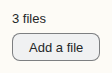
With no catalogue loaded, the label reads "3 files", and "4 files" after a press of the button. When an Icelandic catalogue is active, count: 3 selects the plural form provided by the translator.
ljos check holds a message to what a catalogue can carry: a form that is not written out cannot be extracted (i18n-literal), forms without other are reported (i18n-other), and a translated text joined to a value with + is two messages (i18n-concat), whose fix is one message such as t`${minutes} minutes ago`.
Translators get a PO catalogue with ICU MessageFormat in it, as Lingui writes it: ljos i18n extract . -o i18n/is.po writes each message once, with where it is used, its context and its note, and keeps every translation when it runs again. The catalogues of an application sit in i18n beside its main file, one file per language: a .po file, a Qt .ts file or a compiled, memory-mapped .ljl. Running the application loads every one of them, and the UI language walks a fallback chain such as is-IS → is → en.
Coming from Qt's qsTr
QML written for Qt translates with qsTr and reads Linguist .ts catalogues. Ljós runs that QML as it is and reads .ts files too, keyed by context (the QML file stem or a Translator pragma), source text and disambiguation. A file in Ljós's API has no qsTr (ljos check reports it as qt-tr), and ljos migrate --write rewrites each call:
Qt
Ljós
qsTr("Open")
t`Open`
qsTr("%1 of %2").arg(a).arg(b)
t`${a} of ${b}`
qsTr("%n file(s)", "", n)
plural(n, { other: `${n} file(s)` })
qsTr("Open", "menu")
t({ message: "Open", context: "menu" })
qsTranslate("Ctx", "x")
t({ message: "x", context: "Ctx" })
qsTrId("id")
t({ id: "id" })
QT_TR_NOOP("x")
msg`x`
Qt.uiLanguage
App.language
ljos migrate --catalogue app_is.ts writes the .ts catalogue's translations as is.po with the same rewrite, so a migrated file keeps them; see Bringing existing QML.
Switching App.language and mirroring layouts
The UI language (App.language) and the formatting locale (Locale.current) are separate settings, though both start from the system environment.
Assigning a new language tag to App.language immediately works out again every translated binding and function on screen, and any components created afterwards start in the new language (until App.language names a translated language, source text is shown).
The language tag may be written with an underscore or a hyphen, and a more specific tag finds a catalogue for a less specific one: de_AT and de-CH both use a de catalogue. Assigning the empty string means no language, so source text is shown. At startup App.language and Locale.current come from LC_ALL, then LC_MESSAGES, then LANG.
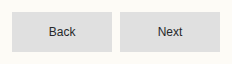
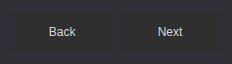
App.layoutDirection follows App.language: switching to a right-to-left language makes it Direction.RightToLeft, and switching back restores left-to-right. Items do not mirror their positions unless you ask them to: bind LayoutMirroring.enabled to the direction on the container you want to mirror. LayoutMirroring is not in Ljos.Ui yet, so this example is still Qt's QML, where the direction is Qt.application.layoutDirection:
Main.qml
QML
Copy
import QtQuick
import QtQuick.Controls.Basic

Row {
    padding: 12
    spacing: 8
    LayoutMirroring.enabled: Qt.application.layoutDirection === Qt.RightToLeft

    Button {
        text: qsTr("Back")
    }

    Button {
        text: qsTr("Next")
    }
}
Edit
Source
What this example draws
Formatting numbers and locales
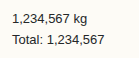
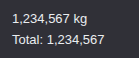
A value in t`…` is shown as it is. To format a number according to the locale's digit grouping and numeral system, call Locale.current.toString(number) (or pass a partial or complete locale name to Locale.named(name)): Arabic locales use Arabic-Indic digits, English groups 1234567 as "1,234,567", and German groups it as "1.234.567". In a form of plural, # is the count grouped the same way. Controls and delegates created early (before the translation catalogue finishes loading) still resolve the active locale.
Main.qml
QML
Copy
pragma Scripts: JavaScript
import Ljos.Ui
import Ljos.Core
import Ljos.Layout
import Ljos.Controls

Column {
    padding: 12
    spacing: 8

    Label {
        text: `${Locale.current.toString(1234567)} kg`
    }

    Label {
        text: t`Total: ${Locale.current.toString(1234567)}`
    }
}
Edit
Source
What this example draws
Qt's QML writes these with String.arg() ("%L1 kg".arg(n), with %L1 grouped by the locale) and Qt.locale(); Ljós runs both in a file written for Qt.
Catalogue formats
Ljós reads .po catalogues (ICU MessageFormat, as ljos i18n extract writes them), Qt's .ts files (read and watched directly in development, so they hot-reload) and its own binary .ljl catalogues. Compiled .qm catalogues are not read.
App.language is writable and has a change signal, and assigning it translates every translated binding again.
See also
Localisation
Translate text and plurals with t``, format locale-aware numbers, switch UI languages at run time, and mirror layouts for right-to-left scripts.
Use t`…`, plural, Locale, App.language and LayoutMirroring to translate user-interface text, handle plural forms, format numbers with locale-specific digits and separators, and mirror layouts for right-to-left languages.
Translating text and plurals with t`…`
Write user-facing text as t`…`, a tagged template from Ljos.Core. When the active catalogue has a translation for the current UI language, t returns it; when it has none, the text is shown as written. A value in the template is a placeholder of the message: t`Hello ${name}` is the message Hello {name} in the catalogue, so a translator sees each value by name and can move it. A value that is not a bare name is numbered ({0}, {1}).
Counts and choices nest inside t and are ICU MessageFormat's:
plural(n, { one: "# file", other: "# files" }) picks the form the UI language uses for n; # is the count, grouped as the locale writes it. A number key matches exactly (0: "No files"), and other is required.
select(role, { admin: "Administrator", other: "Member" }) picks by a value, and selectOrdinal(n, { one: "#st", two: "#nd", few: "#rd", other: "#th" }) by an ordinal.
t({ message: "Open", context: "menu", comment: "The File menu" }) tells two meanings of one text apart and leaves a note for the translator; msg`…` marks a message to translate later, where it is shown with t(descriptor).
Plural rules follow ICU4X PluralRules, with a small override table for languages whose catalogues count their forms differently from CLDR: Icelandic uses two forms, where the first applies to counts ending in 1 except 11.
Write this as Main.qml and run ljos check on its directory:
Main.qml
QML
Copy
What this example draws
Edit
Source
import Ljos.Ui
import Ljos.Core
import Ljos.Layout
import Ljos.Controls

Column {
    id: files
    padding: 12
    spacing: 8
    property int count: 3

    Label {
        text: plural(files.count, { one: "# file", other: "# files" })
    }

    Button {
        text: t`Add a file`
        onClicked: files.count += 1
    }
}
Show all 20 lines
With no catalogue loaded, the label reads "3 files", and "4 files" after a press of the button. When an Icelandic catalogue is active, count: 3 selects the plural form provided by the translator.
ljos check holds a message to what a catalogue can carry: a form that is not written out cannot be extracted (i18n-literal), forms without other are reported (i18n-other), and a translated text joined to a value with + is two messages (i18n-concat), whose fix is one message such as t`${minutes} minutes ago`.
Translators get a PO catalogue with ICU MessageFormat in it, as Lingui writes it: ljos i18n extract . -o i18n/is.po writes each message once, with where it is used, its context and its note, and keeps every translation when it runs again. The catalogues of an application sit in i18n beside its main file, one file per language: a .po file, a Qt .ts file or a compiled, memory-mapped .ljl. Running the application loads every one of them, and the UI language walks a fallback chain such as is-IS → is → en.
Coming from Qt's qsTr
QML written for Qt translates with qsTr and reads Linguist .ts catalogues. Ljós runs that QML as it is and reads .ts files too, keyed by context (the QML file stem or a Translator pragma), source text and disambiguation. A file in Ljós's API has no qsTr (ljos check reports it as qt-tr), and ljos migrate --write rewrites each call:
Qt
Ljós
qsTr("Open")
t`Open`
qsTr("%1 of %2").arg(a).arg(b)
t`${a} of ${b}`
qsTr("%n file(s)", "", n)
plural(n, { other: `${n} file(s)` })
qsTr("Open", "menu")
t({ message: "Open", context: "menu" })
qsTranslate("Ctx", "x")
t({ message: "x", context: "Ctx" })
qsTrId("id")
t({ id: "id" })
QT_TR_NOOP("x")
msg`x`
Qt.uiLanguage
App.language
ljos migrate --catalogue app_is.ts writes the .ts catalogue's translations as is.po with the same rewrite, so a migrated file keeps them; see Bringing existing QML.
Switching App.language and mirroring layouts
The UI language (App.language) and the formatting locale (Locale.current) are separate settings, though both start from the system environment.
Assigning a new language tag to App.language immediately works out again every translated binding and function on screen, and any components created afterwards start in the new language (until App.language names a translated language, source text is shown).
The language tag may be written with an underscore or a hyphen, and a more specific tag finds a catalogue for a less specific one: de_AT and de-CH both use a de catalogue. Assigning the empty string means no language, so source text is shown. At startup App.language and Locale.current come from LC_ALL, then LC_MESSAGES, then LANG.
App.layoutDirection follows App.language: switching to a right-to-left language makes it Direction.RightToLeft, and switching back restores left-to-right. Items do not mirror their positions unless you ask them to: bind LayoutMirroring.enabled to the direction on the container you want to mirror. LayoutMirroring is not in Ljos.Ui yet, so this example is still Qt's QML, where the direction is Qt.application.layoutDirection:
Main.qml
QML
Copy
What this example draws
Edit
Source
import QtQuick
import QtQuick.Controls.Basic

Row {
    padding: 12
    spacing: 8
    LayoutMirroring.enabled: Qt.application.layoutDirection === Qt.RightToLeft

    Button {
        text: qsTr("Back")
    }

    Button {
        text: qsTr("Next")
    }
}
Show all 16 lines
Formatting numbers and locales
A value in t`…` is shown as it is. To format a number according to the locale's digit grouping and numeral system, call Locale.current.toString(number) (or pass a partial or complete locale name to Locale.named(name)): Arabic locales use Arabic-Indic digits, English groups 1234567 as "1,234,567", and German groups it as "1.234.567". In a form of plural, # is the count grouped the same way. Controls and delegates created early (before the translation catalogue finishes loading) still resolve the active locale.
Main.qml
QML
Copy
What this example draws
Edit
Source
pragma Scripts: JavaScript
import Ljos.Ui
import Ljos.Core
import Ljos.Layout
import Ljos.Controls

Column {
    padding: 12
    spacing: 8

    Label {
        text: `${Locale.current.toString(1234567)} kg`
    }

    Label {
        text: t`Total: ${Locale.current.toString(1234567)}`
    }
}
Show all 18 lines
Qt's QML writes these with String.arg() ("%L1 kg".arg(n), with %L1 grouped by the locale) and Qt.locale(); Ljós runs both in a file written for Qt.
Catalogue formats
Ljós reads .po catalogues (ICU MessageFormat, as ljos i18n extract writes them), Qt's .ts files (read and watched directly in development, so they hot-reload) and its own binary .ljl catalogues. Compiled .qm catalogues are not read.
App.language is writable and has a change signal, and assigning it translates every translated binding again.
See also