


Shapes, gradients, canvas
and effects
Draw vector paths with Shape and VectorImage, paint script
graphics with Canvas, and apply gradients, shadows, blurs,
shaders and particles.
Use
Shape (QtQuick.Shapes) and VectorImage (QtQuick.VectorImage) for vector paths and SVG drawings, Canvas for 2D scripted drawing, Gradient and ShapeGradient for colour transitions, RectangularShadow and MultiEffect (QtQuick.Effects) for shadows, blurs and masks, ShaderEffect for custom GLSL shaders, and ParticleSystem (QtQuick.Particles) for particle emitters.Import
QtQuick.Shapes to draw vector paths inside a Shape. A Shape paints its ShapePath children in declaration order (later paths paint over earlier ones) along with any regular item children. A Shape with no paths has zero size and an empty boundingRect; when given paths and no explicit size of its own, it sizes itself to the far corner of boundingRect (which is the path's bounds grown by half its strokeWidth on each side, with ShapePath.SquareCap reaching further than FlatCap or RoundCap). Paths are still painted even when they extend beyond the Shape's own size.Use
containsMode to control hit testing with contains(): Shape.BoundingRectContains (0, the default) matches any point inside the bounding rectangle, while Shape.FillContains (1) matches only points inside the filled paths.Each
ShapePath has defaults fillColor: "#ffffff", strokeColor: "#ffffff" with strokeWidth: 1, joinStyle: ShapePath.BevelJoin (or MiterJoin, RoundJoin), capStyle: ShapePath.SquareCap (or FlatCap, RoundCap), miterLimit: 2 (a miterLimit of 0 bevels every corner) and strokeStyle: ShapePath.SolidLine.Setting
strokeWidth to 0 or a negative number suppresses the outline, leaving only the fill.An open path is filled as if a straight line closed it back to
startX, startY, without stroking that closing edge.fillRule (ShapePath.OddEvenFill or ShapePath.WindingFill) decides whether regions wrapped twice by the path are left empty or filled.Setting
strokeStyle: ShapePath.DashLine uses dashPattern (measured in stroke widths, defaulting to [4, 2]) and dashOffset.Inside a
ShapePath (or standalone Path), build geometry from PathMove, PathLine, PathQuad, PathCubic, PathArc, PathAngleArc, PathCurve, PathPolyline, PathMultiline, PathRectangle (with a corner radius clamped to half the shorter side, optionally bevelled) and PathSvg (which parses SVG path data up to the first syntax error and logs the position of any mistake).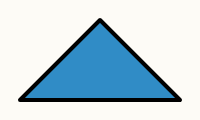
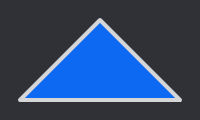
This draws a triangle filled with the palette's
highlight colour, with a 4-unit outline in its windowText colour and rounded corners, both from the reader's colour scheme.You can fill a
Rectangle using its gradient property with a Gradient containing GradientStop children (position and color). A gradient with no stops leaves the rectangle's color intact, a gradient with one stop paints that single colour across the whole box, and when two stops share the same position the one declared first wins. For a ShapePath, assign a LinearGradient, RadialGradient or ConicalGradient to fillGradient and set spread (ShapeGradient.PadSpread by default, ReflectSpread or RepeatSpread).Import
QtQuick.Effects to add shadows, blurs and colour adjustments:RectangularShadow: draws a soft-edged rectangle behind sibling items placed after it. It takes its own bounds, shifts them by offset, grows them by spread, rounds them by radius, and blurs the edge over blur pixels in color (defaults: blur: 10, spread: 0, radius: 0, color: "#000000", offset: 0, 0). MultiEffect: draws its source item with brightness, contrast, saturation, colorization / colorizationColor, blurEnabled / blur / blurMax / blurMultiplier, shadowEnabled (and shadowOpacity, shadowBlur, shadowHorizontalOffset, shadowVerticalOffset, shadowColor) and alpha masking (maskEnabled, maskSource, maskThresholdMin, maskThresholdMax, maskInverted). Note that MultiEffect does not hide its source item—the source is still drawn in its own place unless you hide it or use ShaderEffectSource. 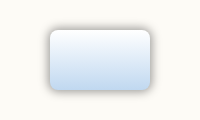
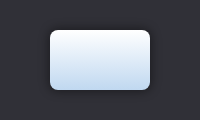
Here the
RectangularShadow sits behind the gradient-filled Rectangle, shifted 4 pixels down, grown by 2 pixels and blurred over 12 pixels.Canvas provides a 2D drawing surface driven from script. It paints once automatically when first shown, passing the dirty rectangle (the whole canvas on first paint) to onPaint, where you call getContext("2d"). After the initial paint, an idle Canvas does no work until you call requestPaint() (or markDirty), and whatever was drawn stays on the canvas—including when the canvas grows—until you draw over it or clear it. What getContext gives has no type yet, so a file that paints on a Canvas keeps its scripts JavaScript with pragma Scripts: JavaScript.
In a 2D canvas context, shadows default to opaque black (a blur of
0 or less is ignored), hatching patterns repeat an 8 by 8 pixel cell from the canvas origin, and putImageData replaces the destination pixels rather than compositing over them.To display an SVG file as scalable vector paths rather than a rasterised bitmap, import
QtQuick.VectorImage and use VectorImage. Its implicitWidth and implicitHeight come from the SVG file, fillMode defaults to VectorImage.Stretch (alongside NoResize, PreserveAspectFit and PreserveAspectCrop), and enlarging the item keeps its edges sharp. A missing SVG file leaves the item empty and logs a warning.
ShaderEffect runs custom vertex and fragment shaders named by URL (vertexShader, fragmentShader). Any QML property you declare on the ShaderEffect becomes a uniform of the same name, and sampler properties accept an Image, a Canvas, a ShaderEffectSource or an Item with layer.enabled: true.Watch how shader files are loaded in Ljós:
Ljós does not read compiled
.qsb shader containers. When you set a shader URL ending in X.frag.qsb, Ljós looks for X.frag.ljsh or compiles the GLSL 440 source file X.frag beside it. If neither exists, or if the shader fails to compile, status reports an error and log explains why. ShaderEffectSource captures sourceItem into a texture ( optionally cropped by sourceRect and sized by textureSize) and draws it stretched across itself. Even an invisible sourceItem appears in the captured texture; set hideSource: true when you want to hide the original item while showing the capture. By default live: true updates the capture whenever sourceItem changes; with live: false, the first capture is kept until you call scheduleUpdate().Import
QtQuick.Particles to use ParticleSystem (running, paused, empty, start(), stop()), Emitter and ImageParticle (plus directions and affectors AngleDirection, PointDirection, TargetDirection, Wander, Age, EllipseShape, MaskShape). A paused system or disabled Emitter emits no continuous particles, though calling burst on a disabled emitter still emits particles that age and die. ImageParticle draws particles directly without creating per-particle QML items, and Ljós seeds its particle random number generator deterministically so runs are repeatable.ShaderEffect does not read the compiled .qsb container; for X.frag.qsb, provide X.frag.ljsh or a GLSL 440 X.frag file beside it.Calling
putImageData on a Canvas 2D context replaces existing pixels instead of compositing with them.ParticleSystem uses a fixed random seed so particle runs repeat deterministically.